

Building a Chrome Extension to Detect Disinformation
Because Fake News is So Last Season – Equip Your Browser with Grok's Truth Serum

Hey there, tech enthusiasts and truth-seekers! In an era where misinformation spreads faster than viral cat videos, having tools to fact-check content on the fly is a game-changer. Today, I’m excited to walk you through creating a simple yet powerful Chrome browser extension that analyzes the current webpage for disinformation using the Grok API from xAI. This extension pulls in real-time data and advanced AI reasoning to help you spot false claims, biased info, or outright hoaxes.
Whether you’re a developer looking to tinker with browser extensions, a journalist verifying sources, or just someone tired of fake news in your feed, this project is for you. We’ll cover the requirements, how to implement it, and how to use it. Let’s dive in!

BTW: You can find all the code files included in this blog post at the GitHub repo: https://github.com/rod-trent/JunkDrawer/tree/main/Grok%20Disinformation%20Checker
Why Build This Extension?
Before we get technical, a quick shoutout to why this matters. The Grok API, powered by models like Grok-4, isn’t just smart—it’s designed for neutral, fact-based analysis. It can cross-reference claims with current news and data via live search, making it perfect for debunking disinformation. This extension puts that power right in your browser toolbar, so you can check any page with a click.
Requirements
To get this up and running, you’ll need a few basics. Don’t worry—it’s straightforward and mostly free (except for the API usage).
Hardware/Software
Browser: Google Chrome (version 88 or later, as it supports Manifest V3 extensions).
Development Environment: Any text editor (e.g., VS Code) and a file explorer to create directories.
Operating System: Works on Windows, macOS, or Linux—Chrome extensions are cross-platform.
API Access
Grok API Key: Sign up at x.ai/api and get your key from console.x.ai. You’ll need to add credits (pay-as-you-go; starts cheap). This is crucial since the extension calls the API for analysis.
Subscription Tier: For the advanced model (like ‘grok-4-fast-reasoning’), ensure your account has access—check the docs at docs.x.ai.
Skills
Basic JavaScript knowledge (we’ll use async/await and Fetch API).
Familiarity with JSON and HTML/CSS for the popup interface.
No prior extension experience needed—Chrome makes it easy to load unpacked extensions for testing.
That’s it! No servers, no complex setups. Total setup time: under 10 minutes.
How to Implement It
Implementing the extension involves creating a few files in a directory and loading it into Chrome. We’ll use Manifest V3 (the modern standard) for security and performance. The core logic: Extract text from the active tab, send it to the Grok API with a fact-checking prompt, and display the results.
Step 1: Set Up the Project Directory
Create a folder named grok-disinfo-checker. Inside it, add these files:
manifest.json (defines the extension’s structure).
popup.html (the UI that pops up when you click the icon).
popup.js (the JavaScript logic).
.env (stores your API key securely—don’t share this!).
For the .env file, add:
GROK_API_KEY=your_actual_api_key_hereReplace with your real key. This keeps it out of the code for better security.
Step 2: Write the Manifest File
This is the extension’s blueprint. Copy this into manifest.json:
{
  “manifest_version”: 3,
  “name”: “Grok Disinformation Checker”,
  “version”: “1.0”,
  “description”: “Analyzes the current page for disinformation using the Grok API.”,
  “permissions”: [”activeTab”, “scripting”],
  “host_permissions”: [”https://api.x.ai/*”],
  “action”: {
    “default_popup”: “popup.html”,
    “default_title”: “Check for Disinformation”
  }
}Permissions: activeTab and scripting let us read the page content. host_permissions allows API calls.
Step 3: Create the Popup UI
In popup.html, add this simple interface:
<!DOCTYPE html>
<html>
<head>
  <title>Grok Disinformation Checker</title>
  <style>
    body { width: 300px; padding: 10px; font-family: Arial, sans-serif; }
#result { margin-top: 10px; white-space: pre-wrap; } </style></head><body> <button id=”check” style=”margin-top: 10px; width: 100%;”>Check Page for Disinformation</button> <div id=”result”>Result will appear here...</div> <script src=”popup.js”></script></body></html>Due to how this HTML (like above) affects this blog site, get the full HTML file from the GitHub repo: https://github.com/rod-trent/JunkDrawer/tree/main/Grok%20Disinformation%20Checker
It’s minimal: A button to trigger the check and a div for results.
Step 4: Add the JavaScript Logic
This is where the magic happens. In popup.js:
document.getElementById(’check’).addEventListener(’click’, async () => {
  document.getElementById(’result’).innerText = ‘Loading API key...’;

  let apiKey;
  try {
    const envUrl = chrome.runtime.getURL(’.env’);
    const response = await fetch(envUrl);
    if (!response.ok) {
      throw new Error(’Failed to load .env file.’);
    }
    const envText = await response.text();
    const envLines = envText.split(’\n’);
    for (const line of envLines) {
      const trimmedLine = line.trim();
      if (trimmedLine.startsWith(’GROK_API_KEY=’)) {
        apiKey = trimmedLine.split(’=’)[1].trim();
        break;
      }
    }
    if (!apiKey) {
      throw new Error(’GROK_API_KEY not found in .env file.’);
    }
  } catch (error) {
    document.getElementById(’result’).innerText = `Error loading API key: ${error.message}. Ensure .env exists in the extension directory with GROK_API_KEY=yourkey.`;
    return;
  }

  document.getElementById(’result’).innerText = ‘Analyzing...’;

  try {
    const [tab] = await chrome.tabs.query({ active: true, currentWindow: true });
    const [{ result: pageText }] = await chrome.scripting.executeScript({
      target: { tabId: tab.id },
      func: () => document.body.innerText
    });
    const truncatedText = pageText.substring(0, 20000);

    const prompt = `Analyze the following page content for disinformation, misinformation, or false claims. Use live search to reference current data, news, or events if needed to verify claims. Provide a summary of any issues found, with explanations and sources if possible. If none, say so. Content: ${truncatedText}`;

    const requestBody = {
      messages: [
        { role: ‘system’, content: ‘You are a neutral, fact-checking AI assistant specialized in detecting disinformation.’ },
        { role: ‘user’, content: prompt }
      ],
      model: ‘grok-4-fast-reasoning’,
      search_parameters: { mode: ‘auto’ },
      stream: false,
      temperature: 0.5,
      max_tokens: 1000
    };

    const response = await fetch(’https://api.x.ai/v1/chat/completions’, {
      method: ‘POST’,
      headers: {
        ‘Content-Type’: ‘application/json’,
        ‘Authorization’: `Bearer ${apiKey}`
      },
      body: JSON.stringify(requestBody)
    });

    if (!response.ok) {
      throw new Error(`API error: ${response.status} - ${await response.text()}`);
    }

    const data = await response.json();
    const analysis = data.choices[0].message.content;

    document.getElementById(’result’).innerText = analysis;
  } catch (error) {
    document.getElementById(’result’).innerText = `Error: ${error.message}. Check your API key, credits, or network.`;
  }
});
Key Features:
Loads API key from .env.
Extracts visible text from the page (truncates to 20k chars to fit API limits).
Uses a tailored prompt for analysis.
Calls the Grok API with ‘grok-4-fast-reasoning’ model and auto live search for up-to-date fact-checking.
Handles errors gracefully.
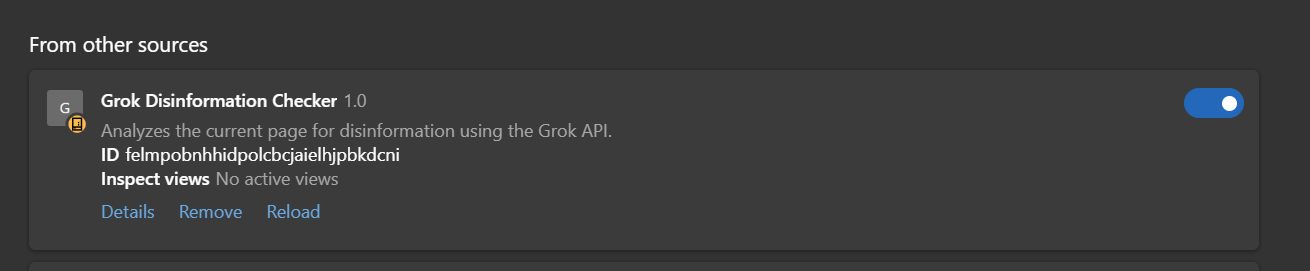
Step 5: Load the Extension in Chrome
Open Chrome and navigate to chrome://extensions/.
Enable “Developer mode” (top right).
Click “Load unpacked” and select your grok-disinfo-checker folder.
Boom! The extension icon appears in your toolbar.
For production, zip the folder (excluding .env if sharing) and submit to the Chrome Web Store.
Potential Enhancements
Persistent Storage: Use chrome.storage to save the API key instead of .env for better security in shared versions.
Better Text Extraction: Integrate a library like Readability.js to grab main article content only.
Customization: Add options for model selection or truncation length in the popup.
How to Use It
Once loaded, it’s super simple:
Navigate to a Webpage: Open any site you want to check (e.g., a news article or social media page).
Click the Extension Icon: It pops up the interface.
Hit the Button: Click “Check Page for Disinformation.” The extension grabs the text, sends it to Grok, and displays the analysis in seconds.
Interpret Results: Grok will summarize issues like “Claim X is false based on Y source” or “No disinformation detected.” It might pull in current events if relevant.
Tips:
Test on known fake news sites to see it in action.
Monitor API costs—each check uses tokens; start with small pages.
If errors occur, check your key/credits in the xAI console.
For accuracy, the live search feature shines on timely topics like elections or health claims.
Wrapping Up
There you have it—a DIY disinformation detector powered by cutting-edge AI. This extension empowers you to browse smarter and fight back against misinformation. If you build it, tweak it, or have questions, drop a comment below—I’d love to hear how it works for you!
Stay curious and skeptical, folks. Until next time, happy coding!