

Creating Custom QR Codes with Logos: A Streamlit App for Effortless Branding
Make QR codes sexy again

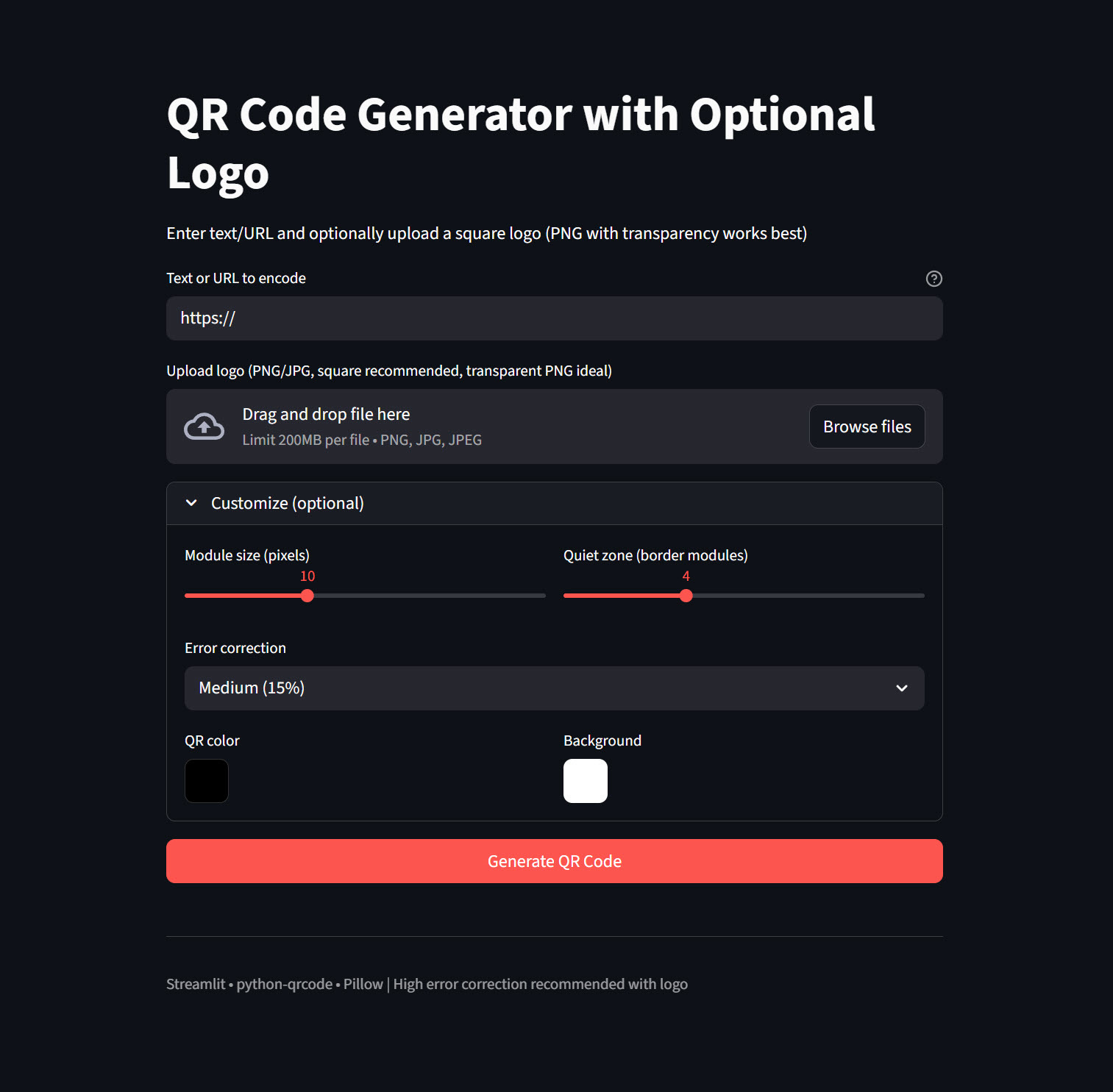
As someone who’s always tinkering with tools to boost productivity and creativity—especially in the realms of cybersecurity, AI, and everyday automation—I’ve got a fun little project to share from my JunkDrawer GitHub repo. It’s a simple yet powerful Streamlit app for generating QR codes, complete with optional logo overlays. If you’ve ever needed to whip up a QR code for a website, Wi-Fi network, business card, or marketing material, but wanted it to look professional and branded, this is for you.
I built this app because I got tired of relying on clunky online QR generators that either watermark your codes or limit customization. With this tool, you can do it all locally or deploy it to the web for free. Let’s dive into what it is, how it works, why it’s useful, and how you can get it running on your own machine.
What Is This App?
At its core, this is a QR Code Generator with Optional Logo—a web-based application powered by Streamlit, a Python framework that turns scripts into interactive apps with minimal effort. The app lets you encode any text or URL into a QR code and, if you want, slap a logo right in the center for that branded touch. It’s designed to be user-friendly, with a clean interface that works great on desktop or mobile.
The code is housed in my JunkDrawer repo under the “QR Code” folder (note: if you’re looking for it, the path is https://github.com/rod-trent/JunkDrawer/tree/main/QR%20Code). The main script is named qr_code_generator_with_logo_fixed.py, and it’s built using popular libraries like qrcode for generation and Pillow for image manipulation.
What Does It Do?
The app packs a punch in a compact package. Here’s a breakdown of its key features:
Input Flexibility: Enter any text, URL, Wi-Fi credentials, vCard details, or whatever you want to encode. It handles it all seamlessly.
Logo Integration: Upload a square PNG or JPG logo (transparent PNGs work best for clean overlays). The app automatically resizes and centers it on the QR code—aiming for about 25-30% of the QR’s width to keep it scannable.
Customization Options:
Adjust module size (pixels per QR block) for finer or coarser codes.
Set the quiet zone (border) to ensure readability.
Choose error correction levels: Low (7%), Medium (15%), Quartile (25%), or High (30%). I recommend High when adding a logo to maintain scannability.
Pick custom colors for the QR pattern (foreground) and background.
Instant Preview and Download: Hit “Generate” and see your QR code right in the browser. Download it as a high-quality PNG with one click.
Error Handling: It gracefully handles issues like invalid inputs or logo processing errors, falling back to a plain QR if needed.
Under the hood, it uses the qrcode library to create the base code, then composites the logo using Pillow’s image processing. The result? Professional-looking QR codes that scan reliably on phones.
Why Is It Useful?
In today’s digital world, QR codes are everywhere—from restaurant menus to event tickets, product packaging, and even resumes. But generic black-and-white squares can look boring. This app lets you create branded QR codes that align with your company’s colors or personal style, making them more engaging and memorable.
For Marketers and Businesses: Embed logos to reinforce branding. Useful for flyers, ads, or merchandise.
For Developers and Hobbyists: Experiment with QR automation, like generating codes for dynamic URLs or integrating into larger projects.
Privacy and Control: Run it locally—no data sent to third-party servers. Or deploy to Streamlit Cloud for team use.
Educational Value: It’s a great example of combining Python libraries for real-world apps, perfect for learning Streamlit or image processing.
I’ve used it myself to create QR codes for my X threads, linking to articles or tools, with a custom logo for that extra flair. It’s saved me time and given me full control over the output.
Requirements
To run this app, you’ll need:
Python: Version 3.8 or higher (tested on 3.12).
Libraries:
streamlit (>=1.24.0): For the web interface.
qrcode[pil] (>=7.4.2): For QR code generation (the [pil] extra includes Pillow integration).
Pillow (>=9.0.0): For image handling and logo compositing.
If you’re setting up a fresh environment, create a requirements.txt file with these lines:
streamlit>=1.24.0
qrcode[pil]>=7.4.2
Pillow>=9.0.0
How to Implement and Set It Up
Implementing this is straightforward—it’s just a single Python script!
Clone the Repo:
git clone https://github.com/rod-trent/JunkDrawer.git
cd JunkDrawer/QR\ Code
Create a Virtual Environment (recommended to avoid package conflicts):
python -m venv venv
source venv/bin/activate  # On Linux/macOS
# Or on Windows: venv\Scripts\activate
Install Dependencies:
pip install -r requirements.txt(If there’s no requirements.txt in the folder, create one as above or install manually.)
Customize If Needed: The script is self-contained, but you can tweak defaults like initial error correction or add more features (e.g., support for other image formats).
How to Run It
Once set up:
Launch the App:
streamlit run qr_code_generator_with_logo_fixed.pyAccess It: Open your browser at http://localhost:8501. You’ll see the title “QR Code Generator with Optional Logo.”
Usage Walkthrough:
Enter your text/URL in the input field (e.g., “https://x.com/rodtrent“).
Optionally upload a logo.
Expand the “Customize” section to tweak settings.
Click “Generate QR Code.”
Preview the result and download the PNG.
Tips for Best Results
With Logos: Use High error correction to ensure the code still scans even with the overlay.
Logo Prep: Square images with transparency avoid ugly borders.
Testing: Always scan your generated QR with a phone app to verify.
Extensions: If you’re adventurous, integrate it with other tools in my JunkDrawer, like automating QR generation from X posts.
Final Thoughts
This QR Code Generator is a prime example of how a few Python libraries can solve everyday problems with style. Whether you’re a beginner dipping into app development or a pro looking for a quick utility, give it a spin. If you fork it or improve it, drop me a line on X—I love seeing what the community builds!
Check out the full code in my JunkDrawer repo. If you have questions or suggestions, hit me up. Happy coding (and scanning)!