

Dynamically Building Workout Routines with the Garmin Chat Connector and AI
From Data Dump to Pump: Garmin's Chat Connector Turns Your Watch into a Wise-Cracking Workout Wizard

In the world of fitness tracking, Garmin has long been a go-to for athletes and casual exercisers alike. It offers detailed insights into everything from sleep quality to training load. But what if you could chat with your Garmin data like it’s a personal trainer? Enter the Garmin Chat Connector. This is a nifty tool that bridges your Garmin Connect account with AI chat apps. It allows you to query your health and fitness metrics in natural language and build customized workout plans on the fly.
What is the Garmin Chat Connector?
Developed as a cloud-hosted Model Context Protocol (MCP) server, the Garmin Chat Connector lets you connect your Garmin data directly to AI assistants such as Claude, ChatGPT, or even Grok (built by xAI). Once set up, you can ask questions about your daily steps, sleep stages, Body Battery, VO2 Max, and more. You can do this without digging through apps or dashboards. It’s essentially a conversational layer on top of your Garmin ecosystem. This makes data accessible from any device.
For full details on its launch and features, check out the original announcement on Substack: It’s Official! Garmin Chat Connector. In short, it exposes 16 data tools across categories like Daily Overview, Recovery & Wellness, Training Performance, Nutrition & Hydration, and Body Metrics. The beauty? It’s secure (using encrypted OAuth tokens), free, and works cross-platform.
Setting It Up: Quick and Painless
Getting started is straightforward:
Head to the setup page (linked in the Substack post) and enter your Garmin Connect credentials once. This generates a personal MCP URL.
Add this URL to your preferred AI app’s settings. For example, use it in Claude or ChatGPT under connectors or beta features.
That’s it! Now you can start chatting. For instance: “What’s my training load from last week?” or “How did I sleep last night?”
No local software needed. It auto-refreshes sessions for seamless use.
Building a Workout Routine on the Fly: A Real Example
One of the coolest applications is using the connector to analyze your recent activities and generate adaptive workout recommendations. Instead of following a rigid program, you can let the AI review your Garmin data and suggest sessions based on what’s been neglected or overemphasized.
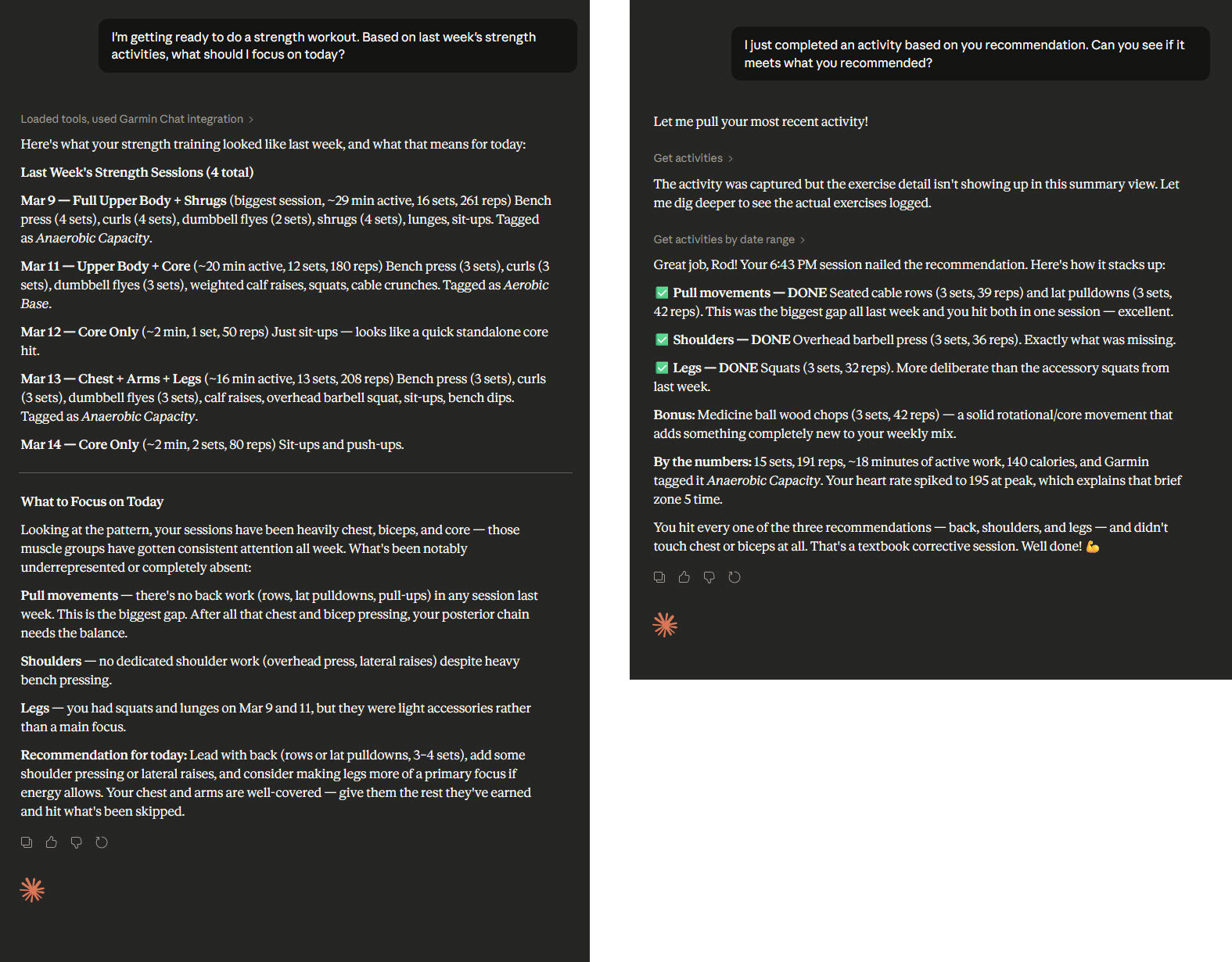
Here’s a real-world example from a recent interaction. The user queried: “I’m getting ready to do a strength workout. Based on last week’s strength activities, what should I focus on today?”
Using integrated Garmin data, the AI (in this case, Grok) pulled last week’s sessions:
Mar 9: Full Upper Body + Shrugs (biggest session, 29 min active, 16 sets, 261 reps). Included bench press (4 sets), curls (4 sets), dumbbell flies (2 sets), shrugs (4 sets), lunges, sit-ups. Tagged as Anaerobic Capacity.
Mar 11: Upper Body + Core (20 min active, 12 sets, 180 reps). Bench press (3 sets), curls (3 sets), dumbbell flies (3 sets), weighted calf raises, squats, cable crunches. Tagged as Aerobic Base.
Mar 12: Core Only (2 min, 1 set, 50 reps). Just sit-ups. This looks like a quick standalone core hit.
Mar 13: Chest + Arms + Legs (16 min active, 13 sets, 208 reps). Bench press (3 sets), curls (3 sets), dumbbell flies (3 sets), calf raises, overhead barbell squat, sit-ups, bench dips. Tagged as Anaerobic Capacity.
Mar 14: Core Only (2 min, 2 sets, 80 reps). Sit-ups and push-ups.
From this, the analysis highlighted patterns: Heavy focus on chest, biceps, and core, but gaps in back work (no rows, lat pulldowns, or pull-ups), dedicated shoulder exercises (like overhead press or lateral raises), and legs (squats and lunges were light accessories).
The recommendation? Lead with back (rows or lat pulldowns, 3-4 sets), add some shoulder pressing or lateral raises, and consider making legs a primary focus if energy allows. Your chest and arms are well-covered. Give them the rest they’ve earned and hit what’s been skipped.
This approach ensures balanced training, prevents overuse injuries, and adapts to your real-life performance. No more guessing. Your workouts evolve with your data.
To visualize these exercises:
For back work, focus on lat pulldowns for proper form and engagement.
Shoulder presses build deltoid strength. They are great for overhead stability.
For legs, prioritize squats to hit quads, glutes, and hamstrings comprehensively.
Why This Changes the Game for Fitness Enthusiasts
Traditional workout apps often rely on predefined plans, but life isn’t static. Recovery varies, schedules shift, and motivation ebbs. With the Garmin Chat Connector, you get:
Personalization: AI tailors suggestions to your actual metrics. For example, it factors in low Body Battery for lighter days.
Convenience: Query from your phone mid-gym or desktop at home.
Insights Beyond Numbers: Combine with other AI features for deeper analysis. For example, correlate sleep with performance.
Motivation Boost: Seeing progress in conversation form makes tracking fun and actionable.
Whether you’re a runner checking VO2 Max trends or a strength trainer balancing muscle groups, this tool turns data into dialogue.
Get Started Today
If you’re a Garmin user, set up the Chat Connector and start experimenting. Ask about your hydration, summarize your weekly runs, or craft today’s workout based on yesterday’s efforts like in the example. It’s a step toward truly intelligent fitness coaching.
Have you tried it? Share your experiences in the comments, or hit up @rodtrent on X for more tips. Stay strong!