

GHASTriage: A One-Command Security Audit for Your GitHub Portfolio
Taming the 73-repo security dumpster fire you swore you'd clean 'later'.

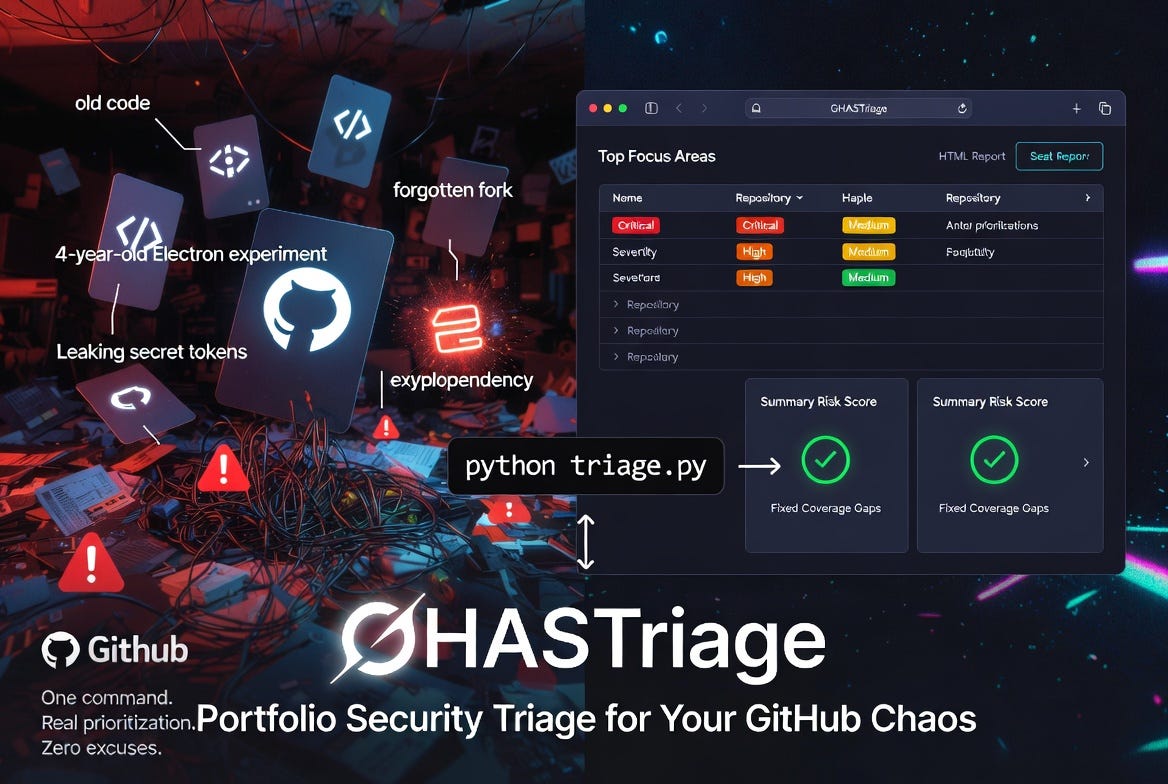
If you have been on GitHub for any length of time, you almost certainly have more repositories than you can name from memory. Side projects. Demo code from a conference talk three years ago. A fork you made during a bug investigation and never deleted. The repo you spun up to test an idea on a Saturday and quietly abandoned by Monday.
GitHub Advanced Security (GHAS) does an excellent job of telling you what is wrong inside any one repository. Open the Security tab and you will see Dependabot alerts, code-scanning findings, and secret-scanning hits, all nicely organized. The problem is that this is a per-repository view. If you have fifty repositories, GitHub will not tell you which one to focus on first. It will tell you what is wrong in each, one tab at a time, if you remember to check.
That gap — between per-repo visibility and portfolio-wide prioritization — is the gap GHASTriage is built to close.
The portfolio problem
Production codebases get attention. They have owners, on-call rotations, and dashboards somebody is paid to watch. Personal repositories almost never have any of that. They accumulate slowly, quietly, and the security debt they carry accumulates with them.
A vulnerable electron version in a four-year-old desktop experiment is not a crisis. A leaked token in a long-forgotten gist is. The trouble is that you cannot easily tell which one you are looking at without a way to view every repository at once and rank them by something more meaningful than “most recently pushed.” Severity matters. Volume matters. Whether secret scanning is even enabled matters — a repository with zero secret-scanning alerts because the feature is off is not the same as a repository with zero alerts because it is genuinely clean.
Introducing GHASTriage
GHASTriage is a small Python command-line tool — single file, standard library only, no dependencies — that walks every repository owned by a GitHub user and emits a single triage report. It pulls open alerts from all three GHAS sources:
Dependabot — vulnerable dependencies
Code scanning — CodeQL and SARIF findings
Secret scanning — leaked credentials
It then writes both a Markdown report and a self-contained HTML report (no JavaScript, no external assets, just open it in a browser). The HTML version is what most people will actually live in: collapsible per-repo sections, color-coded severity badges, summary cards, and links straight to the offending package or rule on GitHub.
Authentication is borrowed from the GitHub CLI (gh). If you can already run gh repo list from your terminal, GHASTriage will work without any additional token configuration. Run it like this:
python triage.pyThat is the whole user interface for the common case. There are flags for scanning organizations (--owner some-org), including archived repositories and forks, controlling parallelism, and choosing where to write the reports — but the default behavior is “scan everything I own and tell me what to fix first.”
How prioritization works
Every report opens with a Top focus areas table — the worst-affected repositories ranked by a severity-weighted risk score. Each open alert contributes points based on its severity:
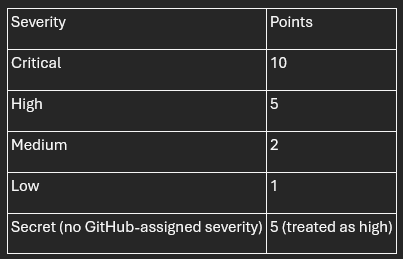
A repository’s risk score is the sum of its alerts’ points. The sort is then straightforward: highest risk first, ties broken by total alert count.
This is intentionally opinionated. A repository with one critical vulnerability outranks a repository with nine medium ones, because remediating one critical is almost always more valuable than remediating nine mediums. If your team weights things differently — and many do — the weights live in a single dictionary near the top of triage.py. Change them and re-run.
The finding people miss: coverage gaps
The most-cited section of the report is “Top focus areas.” The most-actionable section is often Coverage gaps.
Coverage gaps lists every (repository, source) pair where a GHAS source is not enabled. For public repositories this is enormously useful, because all three GHAS sources are free on public repos — they just need to be turned on. If you find that you have, say, twenty public repositories with secret scanning disabled, that is twenty one-click changes you can knock out in an afternoon that materially improve your security posture.
For private repositories, coverage gaps look different. Dependabot is free on private repos too, but code scanning and secret scanning require a paid Advanced Security license. On private repos without GHAS, those rows in the gap table are not bugs to fix — they are licensing decisions to make deliberately, with full visibility into how many repos they affect.
Either way, the value is the same: you stop confusing “no alerts” with “no visibility.”
What a real scan looks like
When I ran GHASTriage against my own account — 73 personal repositories — it found 47 open alerts concentrated in just five repositories. Two of those repositories accounted for 44 of the 47 alerts. One was a four-year-old Electron experiment with four high-severity advisories I had completely forgotten about. The other was a Python sandbox with two dozen pypdf medium-severity findings that had piled up over time without me noticing.
The portfolio view made the prioritization obvious in a way the per-repo view never did. Two afternoons of dependency upgrades would clear the bulk of my exposure. The remaining three repositories had one medium-severity alert each — important, but not urgent.
The coverage-gap section was equally clarifying. Code scanning was enabled on exactly zero of my 73 repositories. Secret scanning was enabled on 39. That is not a vulnerability — it is a blind spot, and it took GHASTriage about ninety seconds to surface a problem I had never thought to look at.
Try it on yourself
The tool is open source under the MIT license at github.com/rod-trent/GHASTriage. Clone it, make sure gh is authenticated, run python triage.py, and open the HTML report in your browser.
If you have ever told yourself you would “get around to” auditing your personal repositories, this is the version of “getting around to it” that takes one command and produces a prioritized list. The hardest part of remediation has always been knowing where to start. GHASTriage will tell you.
A final word on the output: the generated reports contain real vulnerability details from your repositories, including names of private repos and the specific advisories affecting them. Treat them like any other security artifact. The repository’s .gitignore excludes them from being committed by default — keep it that way.