

Introducing AgentBuilderUI: Elevating AI Agent Creation with a User-Friendly Streamlit Interface
Because Typing in a Terminal is So Last Century

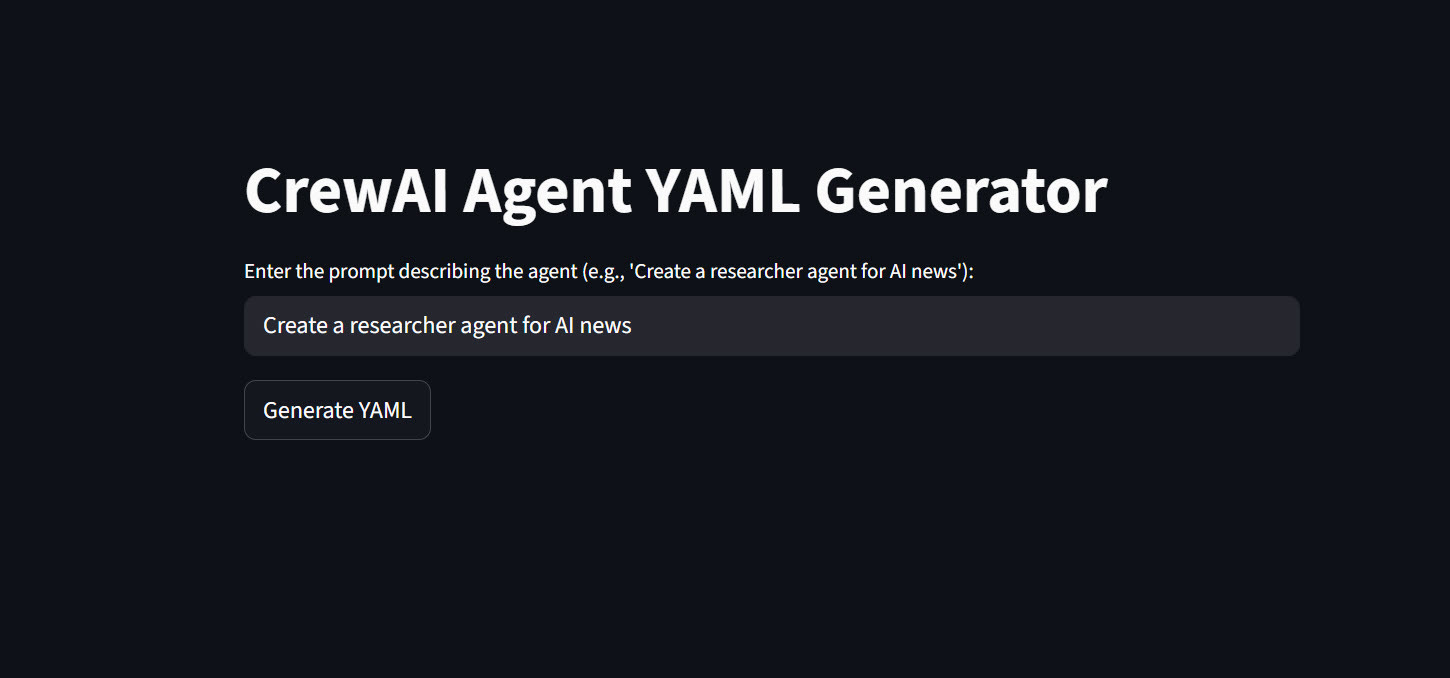
As someone who’s always tinkering with AI tools and automation, I’m excited to share my latest project: AgentBuilderUI. This is a sleek web-based upgrade to my original command-line tool, AgentBuilder, both housed in my JunkDrawer GitHub repo. If you’re into building AI agents with CrewAI, this app simplifies the process of generating custom YAML configurations using the power of xAI’s Grok API. Let’s dive into what it is, why it’s useful, and how you can get it up and running.
What Is AgentBuilderUI?
AgentBuilderUI is a Python-based web application built with Streamlit that allows users to generate YAML files for CrewAI agents. CrewAI is a popular framework for orchestrating multi-agent AI systems, where each “agent” has a defined role, goal, backstory, and optional tools or settings. Instead of manually crafting these YAML configs, the app leverages the Grok API (an OpenAI-compatible endpoint from xAI) to automatically create them based on a simple text prompt.
For example, if you input a prompt like “Create a researcher agent for AI news,” the app queries Grok with a structured system prompt to produce a valid YAML output. This includes essentials like role, goal, and backstory, plus extras like tools, llm, verbose, and allow_delegation if they fit the description.
The app is located at https://github.com/rod-trent/JunkDrawer/tree/main/AgentBuilderUI. It’s a natural evolution from the original command-line version, making agent creation more accessible for beginners and faster for pros.
How It Differs from the Command-Line Version (AgentBuilder)
The original AgentBuilder, found at https://github.com/rod-trent/JunkDrawer/tree/main/AgentBuilder, is a straightforward CLI tool written in Python. It uses argparse to accept a prompt and output file path via the command line, then calls the Grok API to generate the YAML. It’s lightweight and great for scripting or quick runs in a terminal.
Here’s a quick comparison:
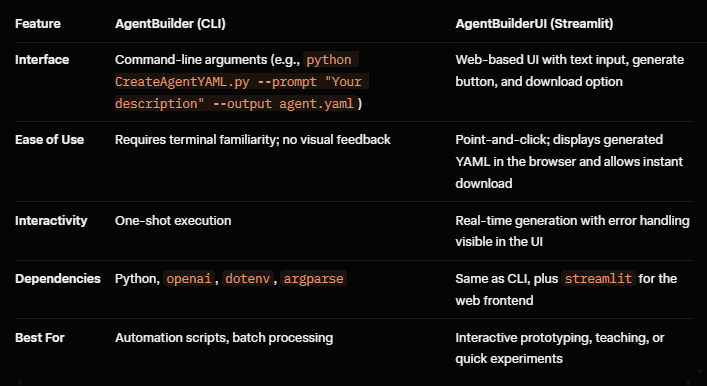
The UI version builds directly on the CLI’s core logic but wraps it in a Streamlit app for better usability. No more typing long commands—just open your browser, enter a prompt, and get your YAML file. It’s especially handy if you’re collaborating or demoing agent setups.
What Does It Do?
At its core, AgentBuilderUI:
Takes a User Prompt: You describe the agent you want (e.g., “A senior data analyst for market trends”).
Calls the Grok API: Using a predefined system prompt, it instructs Grok to generate a CrewAI-compatible YAML structure. The system prompt ensures the output includes key fields like:
role: The agent’s primary function.
goal: What the agent aims to achieve.
backstory: Background context for the agent’s behavior.
Optional: tools (e.g., SerperDevTool), llm (e.g., ‘grok-3’), verbose, allow_delegation.
Displays and Downloads the YAML: The generated content appears in a code block on the page, and you can download it as agent.yaml with one click.
The app handles API key loading via .env files for security and includes basic error checking (e.g., if the API key is missing).
Why Is It Useful?
In the world of AI agent frameworks like CrewAI, configuration files are the blueprint for your agents. Manually writing YAML can be tedious and error-prone—especially when experimenting with different roles or tools. AgentBuilderUI democratizes this by:
Speeding Up Development: Generate configs in seconds without deep YAML expertise.
Encouraging Experimentation: The UI makes it easy to iterate on prompts and see results instantly.
Integration with xAI: Leverages Grok’s capabilities for intelligent, context-aware generation, ensuring the YAML is structured and relevant.
Educational Value: Great for learning CrewAI, as you can study the generated outputs.
Scalability: Once you have the YAML, plug it into your CrewAI projects for tasks like research, automation, or multi-agent workflows.
Whether you’re building agents for research, content creation, or custom bots, this tool saves time and reduces friction. Plus, as a SuperGrok user myself, I love how it ties into xAI’s ecosystem.
Requirements
To run AgentBuilderUI, you’ll need:
Python 3.8+: The app uses modern Python features.
Libraries:
streamlit: For the web interface.
openai: To interact with the Grok API (it’s OpenAI-compatible).
python-dotenv: To load environment variables securely.
xAI API Key: Sign up at x.ai and get your XAI_API_KEY. Store it in a .env file.
Git: To clone the repo (optional but recommended).
No additional setup like databases or servers—just pure Python.
How to Implement and Install
Clone the Repository:
text
git clone https://github.com/rod-trent/JunkDrawer.git
cd JunkDrawer/AgentBuilderUI
Set Up a Virtual Environment (Recommended):
python -m venv venv
source venv/bin/activate  # On Windows: venv\Scripts\activate
Install Dependencies: Create a requirements.txt file with:
streamlit
openai
python-dotenv
Then run:
pip install -r requirements.txtConfigure the API Key: Create a .env file in the directory:
XAI_API_KEY=your_api_key_hereThe main file is likely named app.py or CreateAgentYAML.py (based on the CLI naming)—check the repo for the exact filename. The code imports necessary libraries, defines the generate_agent_yaml function (which mirrors the CLI logic), and sets up the Streamlit UI.
How to Run It
Launch the App:
streamlit run app.py # Replace with the actual filename if differentThis starts a local web server (usually at http://localhost:8501).
Use the Interface:
Open your browser to the local URL.
Enter your prompt in the text input (e.g., “Create a cybersecurity threat analyst agent”).
Click “Generate YAML.”
View the output in the code block.
Download the file using the button.
If you encounter errors (e.g., missing API key), the app will display a helpful message. For deployment, you can host it on Streamlit Sharing, Heroku, or any cloud platform that supports Python apps.
Final Thoughts
AgentBuilderUI takes the solid foundation of the command-line AgentBuilder and makes it more approachable with a modern UI. It’s perfect for anyone dipping their toes into AI agents or streamlining their CrewAI workflows.
As of January 2026, I’m planning to add features like multi-agent generation or prompt templates. Stay tuned, and happy building!
If you found this helpful, star the repo and share it with your network.