

Introducing My Deepfake Detection Tool: Spotting AI-Generated Fakes with Grok Vision
Detecting Deepfakes Faster Than Your Mom Forwards Them

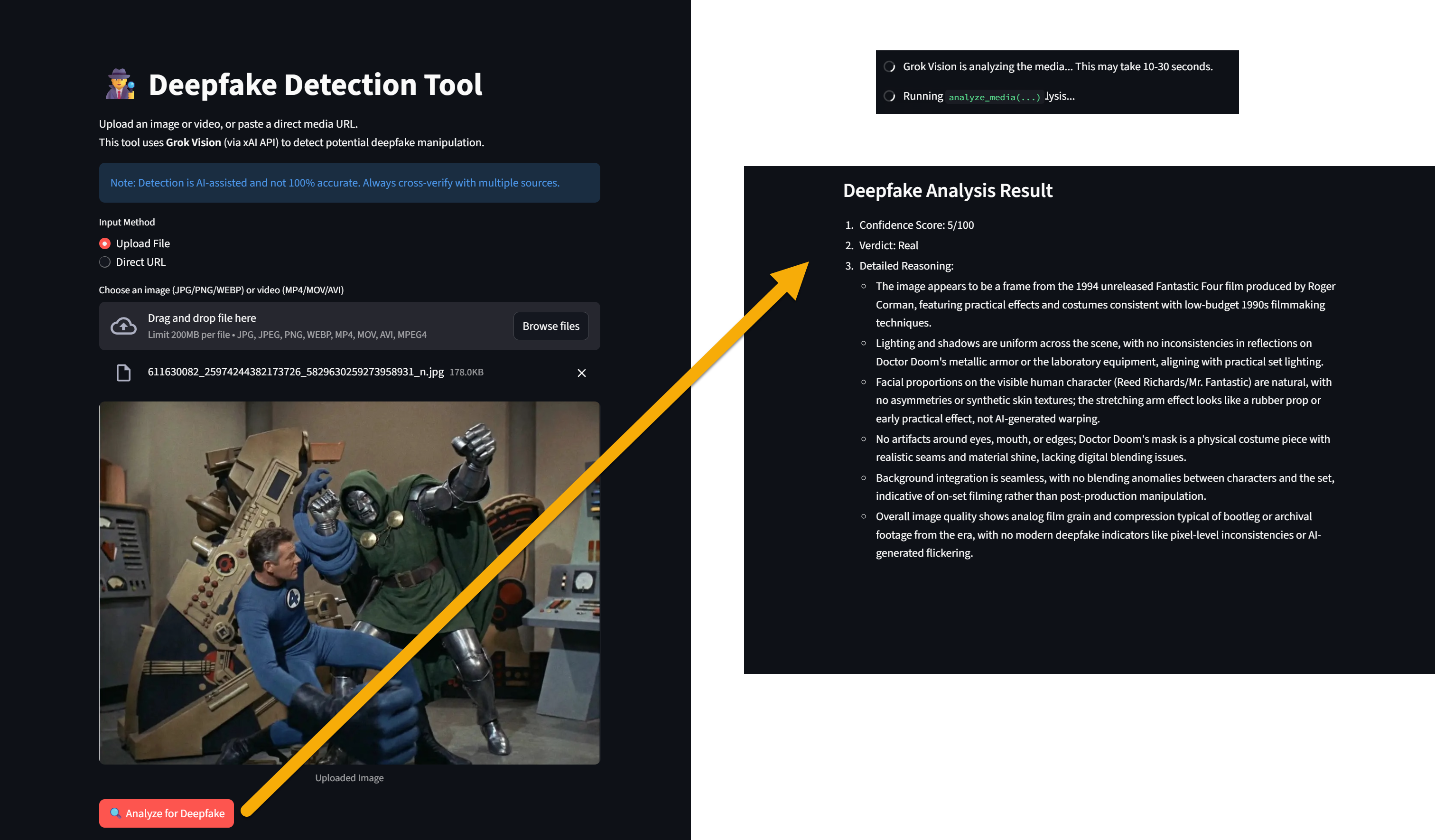
In an era where AI-generated media is becoming indistinguishable from reality, deepfakes pose a serious threat to trust, misinformation, and even security. From viral videos of celebrities saying things they never said to manipulated images used in scams or political propaganda, the need for accessible tools to detect these fakes has never been greater. That’s why I built the Deepfake Detection Tool – a simple, powerful web app powered by Streamlit and xAI’s Grok Vision API. This tool lets anyone upload an image or video (or paste a URL) and get an AI-assisted analysis on whether it might be a deepfake.
I’ve open-sourced the project on GitHub, and I’m excited to share it with the community. Whether you’re a developer looking to tinker, a journalist verifying sources, or just curious about AI ethics, this app is designed to be useful and easy to use. Let’s dive into what it is, how it works, its usefulness, requirements, implementation details, and how to get it running on your machine.
What Is the Deepfake Detection Tool?
The Deepfake Detection Tool is an open-source Streamlit application I created to analyze images and videos for signs of deepfake manipulation. It leverages xAI’s Grok-4 model (or similar vision-capable variants) through the OpenAI-compatible API to scrutinize media for unnatural artifacts, inconsistencies, and synthetic indicators.
At its core, the app acts as an “expert deepfake detection analyst.” It processes your uploaded media and outputs a structured verdict, including:
A Confidence Score out of 100 (higher means more likely a deepfake).
A Verdict (e.g., “Real,” “Likely Deepfake,” or “Uncertain”).
Detailed Reasoning in bullet points, highlighting issues like inconsistent lighting, unnatural facial textures, or temporal flickering in videos.
The project is hosted on GitHub at https://github.com/rod-trent/JunkDrawer/tree/main/Deepfake%20Detection%20Tool. It’s a single Python script (DFDT.py) with everything you need to deploy it locally or on a hosting platform like Streamlit Sharing.
What Does It Do?
Here’s the step-by-step flow:
Input Media: You can upload files (JPG, PNG, WEBP for images; MP4, MOV, AVI for videos) or provide a direct URL to the media.
Preprocessing:
For images: Converts to base64 and prepares for API submission.
For videos: Extracts key frames (default: 10) using MoviePy to check for temporal inconsistencies.
Analysis: Sends the processed media to Grok Vision with a custom prompt instructing the AI to look for deepfake red flags, such as:
Inconsistent shadows or reflections.
Artifacts around eyes, mouth, or hair.
Blending issues with the background.
Flickering or warping across frames.
Output: Displays the results in a clean, structured format. For videos, it notes that the analysis is based on multiple frames for better accuracy.
The app includes a user-friendly UI with spinners for loading, error handling, and sidebar tips. It’s designed to be intuitive – no technical expertise required to use it, though you’ll need some setup to run it yourself.
Why Is It Useful?
Deepfakes are everywhere: In 2025 alone, we’ve seen spikes in AI-manipulated content during elections, celebrity scandals, and cyber fraud. I built this tool to democratize detection, making it free (aside from API costs) and easy to use. Here’s why it’s valuable:
Personal Verification: Check suspicious videos from social media or emails to avoid scams.
Professional Applications: Journalists, fact-checkers, and security pros can quickly triage media.
Educational Value: It teaches users about deepfake indicators, raising awareness.
AI Evolution Insight: By using cutting-edge vision models like Grok-4, it showcases how AI can fight AI-generated threats.
Accessibility: Runs locally or in the cloud, supports both images and videos, and handles URLs for remote content.
While not 100% foolproof (as noted in the app itself – deepfakes are evolving), it’s a solid first-line defense and a great starting point for more advanced forensics.
Requirements
To run my app, you’ll need:
Python 3.8+: The script uses modern libraries.
Dependencies (listed in the code; install via pip):
streamlit: For the web UI.
python-dotenv: To load environment variables.
openai: For interacting with xAI’s API (OpenAI-compatible).
pillow (PIL): Image processing.
requests: For fetching URLs.
moviepy: Video frame extraction (note: Updated to v2+ in the code).
base64, io, tempfile: Built-in, no install needed.
xAI API Key: Sign up at x.ai and get an API key. Usage may incur costs based on your tier.
Environment: A .env file with XAI_API_KEY=your_key_here.
Hardware: Basic CPU/GPU; video processing might be slower on low-end machines.
How to Implement It
The code is self-contained in DFDT.py. Here’s a high-level breakdown for those interested in the internals or wanting to customize it:
Setup and Imports:
Loads environment variables and initializes the OpenAI client with xAI’s base URL.
Defines the model (e.g., “grok-4” – update if needed based on xAI’s latest offerings).
Helper Functions:
image_to_base64: Converts images to base64 for API compatibility.
extract_frames: Uses MoviePy to pull evenly spaced frames from videos (handles errors gracefully).
analyze_media: The core function. Builds a prompt for Grok Vision, sends the media as a list of image URLs, and caches results with Streamlit’s @st.cache_data.
UI Components:
Streamlit elements for title, markdown info, radio buttons for input type, file uploader or URL input.
Displays uploaded/loaded media with st.image or st.video.
Button to trigger analysis, showing results in a subheader.
Sidebar:
Provides about info, tips, and model notes.
Feel free to fork and customize:
Tweak the prompt in analyze_media for more specific checks.
Adjust num_frames in extract_frames for deeper video analysis (but watch API token usage).
Add features like batch processing or result exporting.
The code is kept clean and modular to make it easy for others to build upon.
How to Run It
Clone the Repo:
git clone https://github.com/rod-trent/JunkDrawer.git
cd JunkDrawer/Deepfake\ Detection\ Tool
Install Dependencies: Create a virtual environment (optional but recommended):
python -m venv venv
source venv/bin/activate  # On Windows: venv\Scripts\activate
Then:
pip install streamlit python-dotenv openai pillow requests moviepySet Up .env: Create a .env file in the directory:
XAI_API_KEY=your_xai_api_key_hereRun the App:
streamlit run DFDT.pyOpen your browser to http://localhost:8501 (or the provided URL).
Deploy (Optional):
Host on Streamlit Sharing: Push to a public GitHub repo and connect via their dashboard.
Or use Heroku, Render, or AWS for production.
If you encounter model errors, check xAI’s console for available models and update the MODEL variable.
Limitations and Notes
Accuracy: AI detection isn’t perfect; advanced deepfakes might slip through. Always cross-verify.
API Dependence: Requires an xAI API key; costs apply for heavy use. As of January 2026, Grok-4 is vision-capable, but check for updates.
Media Support: Limited to specified formats; no audio analysis yet.
Performance: Video frame extraction can be slow for long clips – keep videos under a few minutes.
Ethical Use: Use responsibly; don’t rely solely on this for legal or high-stakes decisions.
The app includes clear warnings about these in its UI.
Conclusion
I’m proud of this Deepfake Detection Tool – it’s a practical project that addresses a real-world problem in the age of generative AI. By harnessing Grok Vision, it empowers everyday users to fight back against digital deception. If you’re into AI, security, or just want a useful weekend project, clone it from GitHub and try it out. Feedback and contributions are welcome!
What do you think? Have you tried it on any suspicious media? Let me know in the comments. Stay vigilant!