

Introducing Peloton 2 Garmin Sync: Your Complete Workout Data, Finally Where It Belongs
Peloton and Garmin Refuse to Talk to Each Other. I Fixed It.

I’m excited to announce the release of Peloton 2 Garmin Sync — a free, open-source Windows application that seamlessly syncs your Peloton workouts to Garmin Connect with complete metrics preservation.
If you’re a Peloton user who also tracks fitness data in Garmin Connect, you’ve probably experienced the frustration of having your workout data split across platforms. Today, that problem is solved.
The Problem: Fragmented Fitness Data
As someone who uses both Peloton and Garmin devices, I found myself maintaining two separate fitness histories. My cycling workouts lived in Peloton, while my running and other activities were in Garmin Connect. This made it impossible to:
Get a complete view of my training load
Track long-term fitness trends
Earn Garmin badges and challenges
Share all my workouts with friends on Garmin
Use Garmin’s advanced analytics on Peloton data
Existing sync solutions were either unreliable, required sketchy third-party cloud services, or didn’t preserve important metrics like heart rate zones and power output.
I needed something better. So I built it.
Introducing Peloton 2 Garmin Sync
Peloton 2 Garmin Sync is a Windows desktop application that runs locally on your computer and directly syncs your Peloton workouts to Garmin Connect. No cloud services, no subscriptions, no compromises on your data.
What Makes It Different?
🔒 Privacy First
Runs entirely on your computer
Direct connections to Peloton and Garmin APIs
No third-party servers or cloud storage
Your credentials never leave your machine
Open source — audit the code yourself
📊 Complete Data Preservation
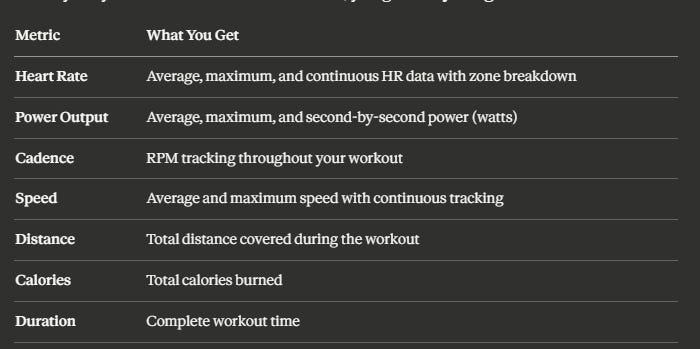
Heart rate with zones
Power output (watts)
Cadence (RPM)
Speed and distance
Calories burned
Second-by-second metrics
🎨 Modern & User-Friendly
Clean Fluent Design interface
One-click batch sync
Auto-login functionality
Real-time status updates
Export workouts as TCX files
🔐 Secure Authentication
Peloton bearer token (no password storage)
Garmin OAuth 2.0 with MFA support
Automatic token refresh
Encrypted local storage
Features Deep Dive
Complete Workout Metrics
When you sync a Peloton workout to Garmin, you get everything:
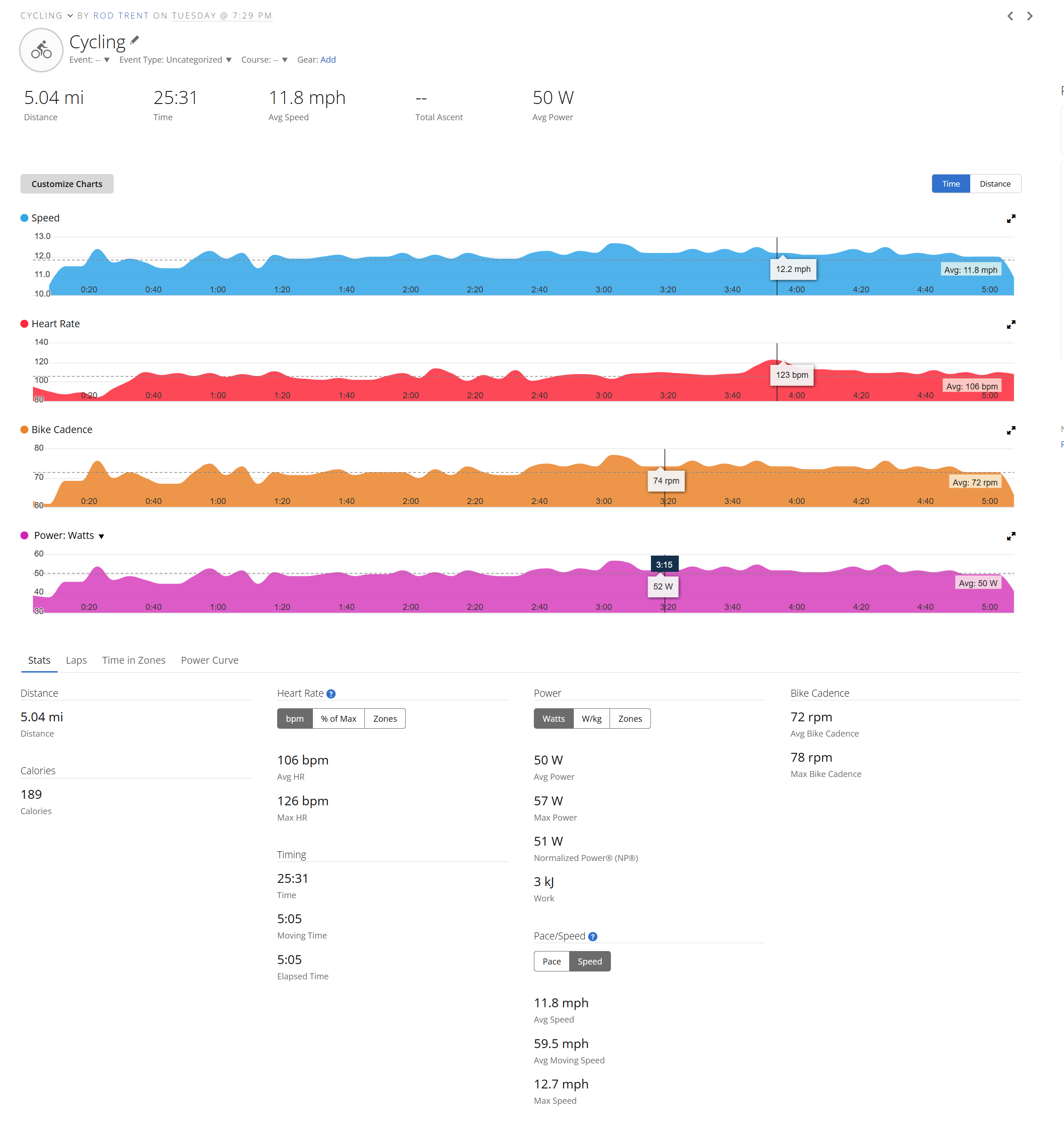
Your Peloton workouts appear in Garmin Connect with beautiful graphs showing:
Heart rate zones (Zone 1-5)
Power output over time
Cadence variations
Speed profile
It’s the same level of detail you’d get from a Garmin Edge cycling computer — but from your Peloton.
Batch Operations
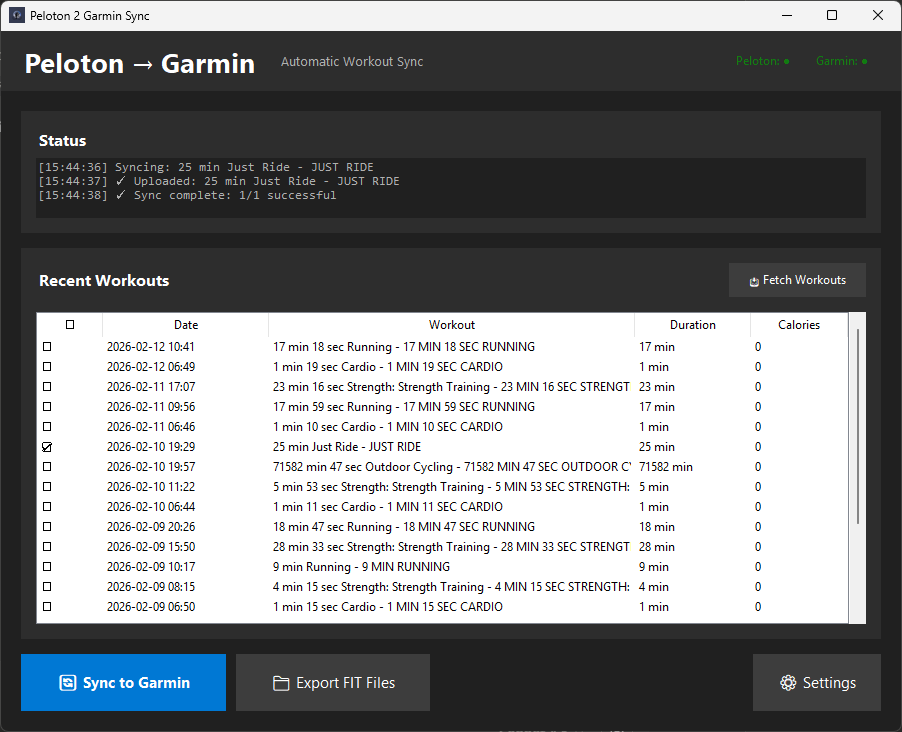
Need to sync multiple workouts at once? No problem. The app shows your 50 most recent Peloton workouts. Simply:
Check the boxes next to the workouts you want
Click “Sync to Garmin”
Watch them upload automatically
Perfect for catching up after a busy week or backfilling historical data.
TCX File Export
Don’t want to sync directly? You can export workouts as TCX (Training Center XML) files — the fitness industry standard format. These files work with:
Garmin Connect
Strava
TrainingPeaks
Any platform that accepts TCX imports
This gives you maximum flexibility in how you manage your fitness data.
Auto-Login
After the initial setup, the app remembers your credentials securely. Just launch it, and you’re immediately ready to fetch and sync workouts. No re-entering passwords, no token refreshes (until expiration), no friction.
How to Get Started
Step 1: Download the App
Get the latest version from the Releases page:
Recommended: Download the Windows installer
Peloton2GarminSync-Setup-v1.0.0.exe~45-65 MB
Includes automatic installation and shortcuts
Alternative: Portable executable (no installation required)
Peloton2GarminSync.exe~50-70 MB
Run from anywhere
For Developers: Full source code
Clone from GitHub
Python 3.11+ required
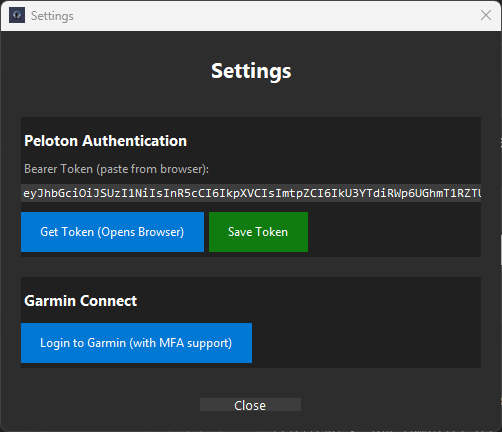
Step 2: Configure Peloton Authentication
The app uses bearer token authentication for Peloton. Here’s how to get yours:
Launch the app and click the ⚙️ Settings button
Click “Get Token (Opens Browser)” — this opens Peloton’s website
Log into Peloton in your browser (if not already logged in)
Open Developer Tools by pressing F12
Click the “Network” tab in Developer Tools
Refresh the page (F5 or Ctrl+R)
Click any request in the list
Find the “Authorization” header in the request details
Copy the entire token — it starts with “Bearer eyJ...”
Paste into the app and click “Save Token”
Don’t worry — this sounds complicated but takes less than 2 minutes. The token is valid for approximately one year, so you only need to do this once (then annually).
Why bearer tokens? They’re more secure than storing passwords, they can be easily revoked, and they’re the recommended authentication method for API access.
Step 3: Configure Garmin Authentication
Garmin authentication is even easier:
Click “Login to Garmin” in the main window
Enter your Garmin email and password
Complete MFA verification if prompted (the app handles this automatically)
Done! OAuth tokens are saved securely
The first login may take a moment as Garmin uses Cloudflare protection. The app handles this automatically — just wait for the green status indicator.
After the initial login, the app auto-connects to Garmin on startup using saved OAuth tokens. No password re-entry needed.
Step 4: Sync Your First Workout
Now for the fun part:
Click “📥 Fetch Workouts” to load your recent Peloton workouts
Select workouts by checking the boxes (or select all with Ctrl+A)
Click “🔄 Sync to Garmin”
Watch the magic happen — the activity log shows real-time progress
Check Garmin Connect — your workouts are there with full metrics!
That’s it! Your Peloton workouts are now in Garmin Connect with heart rate zones, power graphs, cadence data, and everything else.
Real-World Use Cases
The Competitive Athlete
“I’m training for a triathlon and need all my workouts in one place for proper load management. Peloton 2 Garmin Sync lets me see my complete training stress and recovery metrics in Garmin Connect.”
Use case: Sync all Peloton cycling workouts alongside outdoor runs and swims for comprehensive training analytics.
The Streak Keeper
“I’m on a 200-day Garmin Move streak and my Peloton rides weren’t counting. Now they do!”
Use case: Maintain Garmin streaks and earn badges by syncing Peloton workouts that would otherwise be invisible to Garmin.
The Data Analyst
“I love diving into my fitness data. Having everything in Garmin Connect gives me the complete picture with their advanced analytics.”
Use case: Export complete TCX files for analysis in TrainingPeaks, Golden Cheetah, or custom analytics tools.
The Social Sharer
“My friends follow me on Garmin but not on Peloton. Now they can see all my workouts and we can compete on challenges together.”
Use case: Share complete fitness journey with Garmin Connect friends, including Peloton sessions.
The Historical Backfiller
“I had six months of Peloton workouts that weren’t in Garmin. Synced them all in one batch!”
Use case: Batch sync up to 50 recent workouts to complete your Garmin fitness history.
Technical Details (For the Developers)
Built with:
Python 3.11 — Modern, type-hinted Python
tkinter — Native Windows GUI framework
garminconnect — Garmin API wrapper library
garth — Garmin OAuth implementation
PyInstaller — Single-file executable packaging
Inno Setup — Professional Windows installer
The app uses the TCX (Training Center XML) format for workout data exchange. TCX is the fitness industry standard and contains:
Lap summaries
Trackpoint data (timestamp, HR, power, cadence, speed)
Distance calculations
Workout metadata
Architecture
Peloton API → Bearer Token Auth → Fetch Workout Data
                                         ↓
                                   Convert to TCX
                                         ↓
Garmin Connect ← OAuth 2.0 Auth ← Upload Workout
Everything runs locally. No cloud middleman. Direct HTTPS connections.
For Developers: Contributing
The app is fully open source under the MIT License. Visit the GitHub repository to:
Review the code — It’s all there, no secrets
Report bugs — Found an issue? Let me know
Submit pull requests — Improvements welcome
Fork and customize — Make it your own
The codebase includes:
peloton_garmin_fluent_app.py— Main applicationsimple_fit_converter.py— TCX convertergarmin_handler_mfa.py— Garmin authenticationpeloton_bearer_auth.py— Peloton authenticationComplete build scripts and spec files
Documentation includes:
README.md— User guideBUILD_INSTRUCTIONS.md— How to build from sourceInline code comments throughout
Known Issues & Limitations
I want to be transparent about current limitations:
Minor Issues:
“Avg Moving Speed” may display incorrectly in Garmin Connect (cosmetic only — actual speed data is correct)
First-time Garmin login may be delayed by Cloudflare (handled automatically)
Current Scope:
Tested primarily with Peloton Bike workouts
Windows only (Mac/Linux versions possible in future)
Requires manual token refresh after ~1 year
These are all on the roadmap to address in future updates based on user feedback.
What’s Next: Roadmap
Based on initial feedback, here’s what I’m considering for future releases:
Version 1.1 (Planned):
Support for Peloton Tread workouts
Support for Peloton Row workouts
Automatic token refresh notifications
Improved error messages
Performance optimizations
Future Considerations:
Mac version (if there’s demand)
Automatic sync scheduling
Strava direct sync option
Custom workout name templates
Advanced filtering options
But I need your feedback to prioritize!
I Need Your Help
This is a community-driven project, and I need your input to make it better.
🐛 Found a Bug?
Please report it on GitHub Issues with:
Your Windows version
App version
Steps to reproduce
Error messages or screenshots
What you expected vs. what happened
💡 Have a Feature Idea?
I’d love to hear it! Submit a feature request with:
Detailed description
Your use case
How it would benefit users
Any examples from other apps
💬 General Feedback?
What do you love about the app?
What’s confusing or frustrating?
What would make it more useful for you?
Are there workout types I should prioritize?
Leave a comment here, open a GitHub Discussion, or reach out directly.
⭐ Enjoying the App?
If Peloton 2 Garmin Sync is useful to you:
Star the repo on GitHub — it helps others discover it
Share with friends who use Peloton and Garmin
Spread the word on social media or Peloton communities
Contribute code if you’re a developer
Every bit of support helps make the app better for everyone.
A Personal Note
I built this tool out of personal need and frustration. As someone who takes fitness data seriously, I couldn’t accept having my workouts fragmented across platforms. I wanted a solution that was:
Private — no cloud services with access to my data
Reliable — works every time, no surprises
Complete — preserves all metrics, not just summaries
Free — no subscriptions or paywalls
Open — transparent code you can trust
The result is Peloton 2 Garmin Sync. I use it daily, and I hope it’s valuable for you too.
Get Started Today
Ready to unify your fitness data?
📥 Download: Peloton 2 Garmin Sync Releases
📖 Documentation: GitHub Repository
🐛 Report Issues: GitHub Issues
💬 Discussions: GitHub Discussions
Your Peloton workouts deserve to be part of your complete fitness story. Let’s make it happen.
Happy syncing! 🚴♂️💪
Peloton 2 Garmin Sync is an independent project and is not affiliated with, endorsed by, or sponsored by Peloton Interactive, Inc. or Garmin Ltd. All product names, logos, and brands are property of their respective owners.
Comments
What questions do you have? What features would you like to see? Let me know in the comments below!