

Introducing the Microsoft Patch Tuesday AI Agent: Your Automated Guide to Staying Secure
Patch Tuesday, Now with 100% More Grok and 0% More Manual Suffering

Hey folks! If you’re in the world of cybersecurity, IT administration, or just someone who likes to keep tabs on Microsoft vulnerabilities, I’ve got something exciting to share. Today, I’m diving deep into a nifty Python-based tool called the Microsoft Patch Tuesday AI Agent. This script automates the process of fetching, analyzing, and reporting on Microsoft’s monthly security updates—commonly known as Patch Tuesday. It’s powered by AI (specifically Grok from xAI) to generate insightful summaries, and it even emails you the results in a beautiful HTML format.
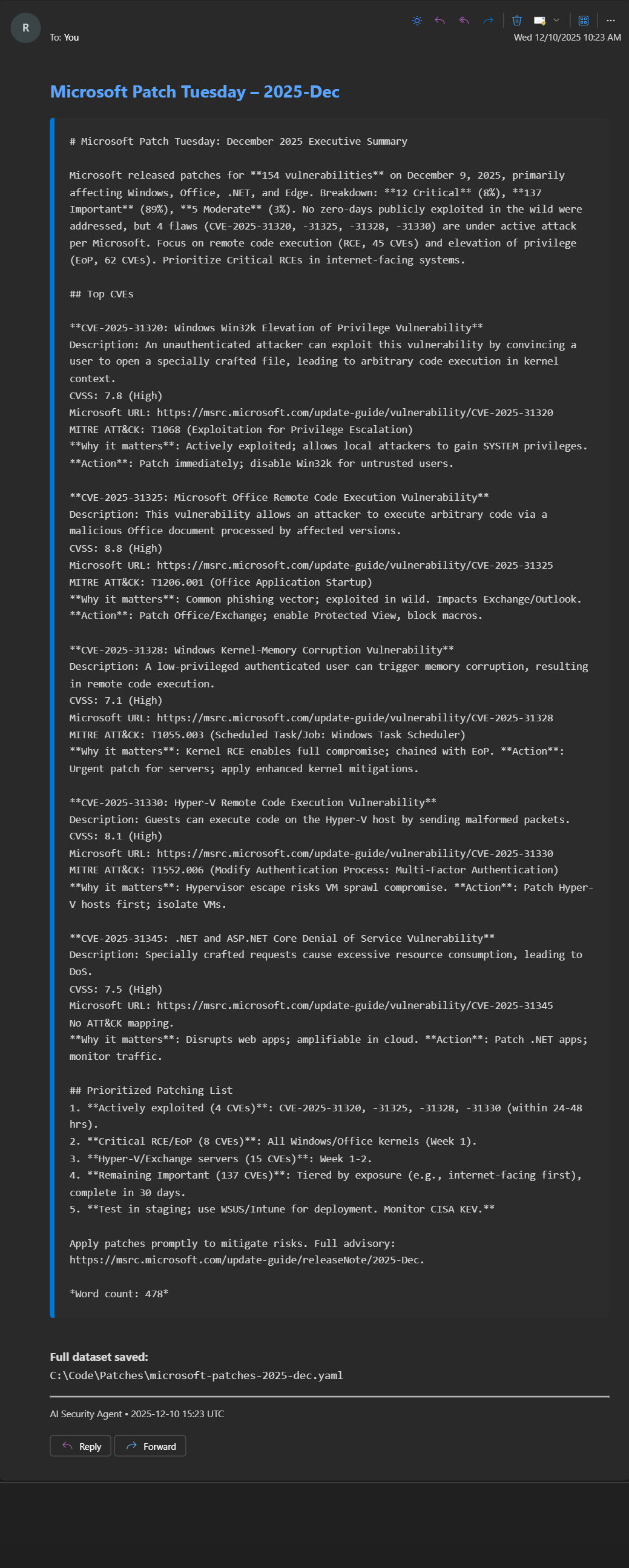
The app is permanently hosted on GitHub at https://github.com/rod-trent/JunkDrawer/tree/main/Patch%20Agent. It’s open-source under the MIT license (based on the script’s comments), so feel free to fork, tweak, and contribute. Let’s break it down step by step: what it is, what it does, why it’s valuable, and how to get it up and running.
What It Is
The Microsoft Patch Tuesday AI Agent is a Python script (patches_agent.py) designed to monitor and report on Microsoft’s latest security patches. It provides features like always fetching the latest data (e.g., December 2025 and beyond), full CVE descriptions in YAML output, direct links to Microsoft CVE pages, MITRE ATT&CK mappings (with inferences), and AI-generated executive summaries delivered via email.
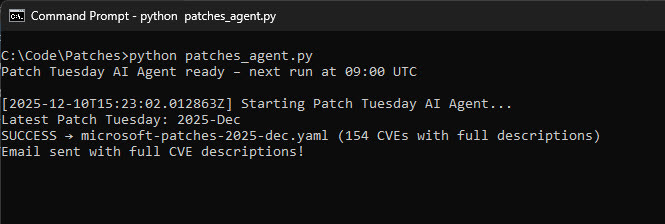
At its core, it’s an automation tool that combines web scraping/API calls to Microsoft’s update services, data parsing, AI analysis via Grok, and email notifications. It runs as a scheduled task, making it perfect for ongoing security monitoring without manual intervention.
What It Does
Here’s the high-level workflow:
Fetches Latest Patch Data: It queries Microsoft’s MSRC (Microsoft Security Response Center) API to get the most recent Patch Tuesday release. This includes the full CVRF (Common Vulnerability Reporting Framework) data for that month.
Parses Vulnerabilities: From the raw data, it extracts key details for each CVE (Common Vulnerabilities and Exposures), such as:
CVE ID and title
Full description (prominently included, unlike summaries that might truncate)
Severity (e.g., Critical)
Exploit status (e.g., “Exploitation More Likely”)
CVSS base score
Affected products (e.g., Windows 11, Microsoft Edge)
KB articles for patches
MITRE ATT&CK mappings (extracted from acknowledgments or inferred based on keywords like “elevation of privilege” mapping to T1068)
Direct URLs to Microsoft, NVD, CVE MITRE, and ATT&CK pages
Saves Data to YAML: Outputs a structured YAML file (e.g.,
microsoft-patches-2025-12.yaml) with all vulnerabilities, total count, and metadata.Generates AI Summary: Uses Grok AI (via the xAI API) to create a concise executive summary. This focuses on top CVEs (Critical or exploited ones), including descriptions, scores, URLs, MITRE mappings, why they matter, and recommended actions. The summary is professional, under 650 words, and ends with a prioritized patching list.
Sends Email Notification: Crafts a polished HTML email with the AI summary, links to the YAML file, and a timestamp. It uses SMTP (e.g., via Gmail) to send to configured recipients.
Runs on Schedule: By default, it checks daily at a configurable time (e.g., 09:00 UTC) and runs immediately on startup for testing.
The script is smart about handling data: it uses safe extraction methods to avoid crashes, prioritizes full descriptions, and even infers MITRE mappings when not explicitly provided.
Why It’s Valuable
In a world where cyber threats evolve daily, staying on top of Patch Tuesday is crucial—Microsoft releases fixes for dozens (sometimes hundreds) of vulnerabilities each month. Manually checking the MSRC site, parsing CVEs, and summarizing for your team is time-consuming and error-prone.
This agent automates it all, saving hours of work. Key benefits:
Timeliness: Always grabs the latest release, ensuring you’re never behind.
Depth with AI Insight: Full CVE details plus Grok’s analysis provide context (e.g., “why it matters”) that’s actionable for executives or security teams.
MITRE Integration: Helps with threat modeling by linking to ATT&CK techniques, which is gold for SOC analysts.
Email Delivery: No need to log into dashboards—get reports straight to your inbox.
Customization and Extensibility: Open-source, so you can add features like Slack notifications or integrate with ticketing systems.
Cost-Effective: Relies on free Microsoft APIs and a Grok API key (which has usage limits, but xAI offers free tiers).
For sysadmins, security pros, or even hobbyists, it’s a proactive tool to mitigate risks like zero-days or exploited vulns. Plus, in regulated industries (e.g., finance, healthcare), documented patching processes are a compliance must-have.
Requirements
To run this, you’ll need:
Python 3.8+: The script uses Python 3 features and libraries.
Dependencies: Install via pip. The script imports:
requests(for API calls)yaml(for data output)schedule(for scheduling)openai(for Grok API integration)dotenv(for loading .env)smtplibandemail.mime(built-in for emailing)Other built-ins:
os,re,time,datetime,pathlib
Run
pip install requests pyyaml schedule python-dotenv openaito get them.API Keys and Credentials:
Grok API Key: Get one from x.ai (free tier available, but check limits for heavy use).
Email Credentials: Sender email, password (app password for Gmail), and recipient(s).
.env File: Create one in the script’s directory with:
GROK_API_KEY=your_grok_key_here
EMAIL_SENDER=your.email@example.com
EMAIL_PASSWORD=your_app_password
EMAIL_RECIPIENT=recipient1@example.com,recipient2@example.com
RUN_TIME=09:00  # Optional, defaults to 09:00
Hardware/Environment: Any machine with internet access (for APIs and email). Runs fine on a VPS, Raspberry Pi, or local server for scheduling.
No additional setup like databases—just Python and the libs.
How to Implement It
Clone or Download: Grab the script from GitHub:
git clone https://github.com/rod-trent/JunkDrawer.gitand navigate toPatch Agentfolder. Or downloadpatches_agent.pydirectly.Set Up .env: As above, fill in your keys. Make sure EMAIL_PASSWORD is secure (use an app-specific password for Gmail to avoid 2FA issues).
Install Dependencies: In a virtual environment (recommended:
python -m venv env; source env/bin/activate), runpip install -r requirements.txt(create one if needed with the libs listed).Customize (Optional):
Tweak the prompt in
generate_ai_summaryfor different summary styles.Add more email recipients or change the HTML template in
send_email.Modify MITRE inference logic in
infer_attack_mappingfor better accuracy.
Test the API Calls: Run parts of the script manually to ensure Microsoft APIs respond (they’re public but rate-limited).
How to Run It
Manual Run: Simply execute
python patches_agent.py. It will fetch data, generate YAML, create the AI summary, send the email, and then enter a loop checking the schedule.Immediate Execution: On startup, it calls
daily_task()right away, so you’ll get results instantly for testing.Background Running: Use tools like
screen,tmux, or systemd (on Linux) to keep it running as a service. For Windows, Task Scheduler can launch it.
If something fails (e.g., API timeout), it prints errors but continues the loop.
How to Use It
Once running:
Check the console for logs (e.g., “Latest Patch Tuesday: 2025-12”).
Find the YAML file in the current directory for raw data.
Receive emails on schedule—open them to see the formatted summary with clickable links.
For analysis: Load the YAML in tools like Jupyter for further querying, or integrate with SIEM systems.
Troubleshooting:
API Key Issues: Ensure your Grok key is valid and has quota.
Email Failures: Check SMTP settings; test with a simple script.
Data Gaps: If descriptions are missing, it’s due to Microsoft’s data— the script falls back gracefully.
How to Set It to Run on a Schedule
The script uses the schedule library for cron-like jobs:
By default, it runs
daily_task()every day atRUN_TIME(from .env, e.g., “09:00” in 24-hour format, assuming UTC).The main loop (
while True: schedule.run_pending(); time.sleep(60)) checks every minute.
To customize:
Edit
RUN_TIMEin .env (e.g., “14:30” for 2:30 PM).For different intervals, modify the scheduler line:
schedule.every().day.at(RUN_TIME).do(daily_task). Change toevery().weekorevery(5).minutesas needed.Deploy as a Service:
Linux: Create a systemd unit file (e.g.,
/etc/systemd/system/patch-agent.service) with:
[Unit]
Description=Patch Tuesday AI Agent
[Service]
ExecStart=/usr/bin/python3 /path/to/patches_agent.py
WorkingDirectory=/path/to/script
Restart=always
[Install]
WantedBy=multi-user.target
Then systemd enable --now patch-agent.service.
Windows: Use Task Scheduler to run the script daily at your time.
Cloud: Host on AWS Lambda, Google Cloud Run, or a VPS with cron.
This ensures it runs autonomously, emailing you fresh reports monthly (or whenever new patches drop).
Final Thoughts
The Microsoft Patch Tuesday AI Agent is a game-changer for automating security intelligence. It’s simple yet powerful, blending raw data with AI smarts. Give it a spin, and let me know in the comments if you add cool features—like integrating with threat feeds or generating PDF reports. Stay secure out there!
Disclaimer: Always verify vulnerabilities manually for critical systems. This tool relies on public APIs, which could change.