

Introducing the Must Learn KQL Learning Hub: Your AI-Powered Interactive KQL Companion
Learn Kusto Query Language the Smart Way with Hands-On Practice and AI Assistance

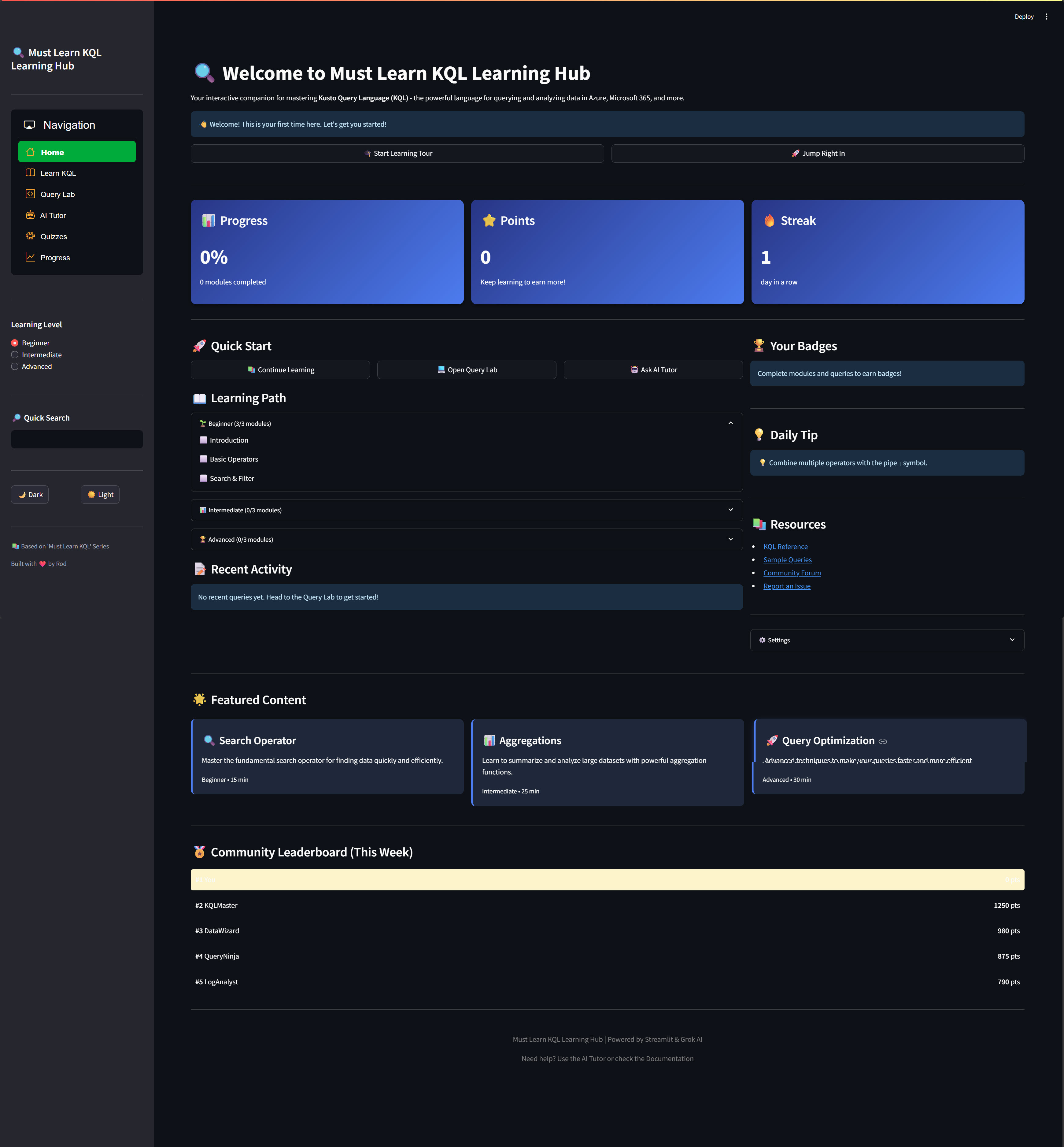
I’ve built a free, open-source, AI-powered learning application that makes mastering KQL (Kusto Query Language) engaging, interactive, and effective. It’s like having a personal KQL tutor available 24/7, complete with interactive lessons, a query playground, quizzes, and gamification to keep you motivated.
Quick Links:
📦 GitHub Repository: https://github.com/rod-trent/MustLearnKQL/tree/main/App
📚 Must Learn KQL Series: https://github.com/rod-trent/MustLearnKQL
🚀 Get Started in 5 Minutes: Jump to the Quick Start Guide
Why I Built This App
Over the past few years, I’ve been writing the “Must Learn KQL” series - a comprehensive guide to learning Kusto Query Language for Azure Data Explorer, Microsoft Sentinel, Azure Monitor, and more. While the written content has helped thousands of people, I kept hearing the same feedback:
“I need more hands-on practice”
“I wish I had immediate feedback on my queries”
“It’s hard to know if I’m making progress”
“I get stuck and don’t have anyone to ask”
“I lose motivation after a few weeks”
So I decided to solve these problems by building an interactive learning companion that combines:
✅ Structured Learning - Progressive modules from beginner to advanced
✅ Hands-On Practice - Real query execution with instant feedback
✅ AI-Powered Tutoring - Get help 24/7 from Grok AI
✅ Gamification - Points, badges, and streaks to stay motivated
✅ Progress Tracking - See your improvement over time
The result is the Must Learn KQL Learning Hub - and it’s completely free and open source.
What Makes This App Special?
🎓 Complete Learning Path
The app includes a structured curriculum organized into three levels:
Beginner Level:
Introduction to KQL
Basic Operators (where, project, take, sort)
Search & Filter Techniques
Intermediate Level:
Aggregation Functions
Join Operations
Time Series Analysis
Advanced Level:
User-Defined Functions
Advanced Analytics & Statistics
Query Optimization & Performance
Each module includes:
Clear explanations with examples
Interactive demonstrations
Practice exercises
Knowledge checks and quizzes
🤖 AI-Powered Learning Assistant
This is where things get really interesting. The app integrates with Grok’s xAI API to provide:
Natural Language to Query Generation: You can describe what you want in plain English, and the AI generates the KQL query:
You: "Find all failed login attempts from the last week"

AI generates:
SecurityEvent
| where EventType == "LogonFailure"
| where TimeGenerated > ago(7d)
| project TimeGenerated, User, Computer, IPAddress
Intelligent Error Explanations: When your query fails, the AI:
Explains what went wrong in simple terms
Shows you the corrected query
Explains why the fix works
Gives tips to avoid the error in the future
Concept Explainer: Ask about any KQL operator, function, or concept and get detailed explanations tailored to your skill level.
Practice Exercise Generation: The AI can generate custom exercises on any topic you want to practice.
💻 Interactive Query Lab
The Query Lab is your playground for writing and testing KQL queries:
Real-Time Execution: Run queries against demo data or connect to your own Azure resources
Multiple Views: See results as tables, charts, or JSON
Query History: Every query you run is saved automatically
Favorites: Bookmark queries for quick access
Templates: Start with pre-built query patterns
Export Results: Download results as CSV
The demo mode comes with sample datasets so you can start practicing immediately without any Azure setup.
📝 Interactive Quizzes
Test your knowledge with interactive quizzes for each module:
Multiple-choice questions
Immediate feedback with explanations
Score tracking
AI-generated practice questions
Review mode to learn from mistakes
📊 Progress Tracking & Gamification
Learning is more fun when you can see your progress! The app includes:
Points System:
Complete modules: 50-150 points
Execute queries: 10 points
Pass quizzes: 10 points per correct answer
Solve exercises: 25-50 points
Achievement Badges:
🌱 KQL Novice - Earn 100 points
📊 KQL Practitioner - Earn 500 points
🏆 KQL Expert - Earn 1000 points
🔥 Week Warrior - 7-day learning streak
👑 Month Master - 30-day learning streak
💯 Perfect Score - 100% on any quiz
Analytics Dashboard:
Overall completion percentage
Total points earned
Current learning streak
Quiz performance metrics
Query execution history
Activity timeline
Quick Start Guide
Let’s get you up and running in 5 minutes!
Prerequisites
Python 3.8 or higher - Download Python
Grok xAI API Key - Free tier available at x.ai
Git (optional) - For cloning the repository
Step 1: Download the App
Option A: Using Git (Recommended)
git clone https://github.com/rod-trent/MustLearnKQL.git
cd MustLearnKQL/app
Option B: Direct Download
Click the green “Code” button → “Download ZIP”
Extract the ZIP file
Navigate to the
Appfolder
Step 2: Install Dependencies
Open your terminal/command prompt in the App folder and run:
# Create a virtual environment (recommended)
python -m venv venv

# Activate the virtual environment
# On Windows:
venv\Scripts\activate
# On Mac/Linux:
source venv/bin/activate

# Install required packages
pip install -r requirements.txt
This installs:
Streamlit (web framework)
OpenAI library (for Grok API)
Pandas (data manipulation)
Azure Kusto libraries (optional, for real cluster connections)
And other dependencies
Step 3: Configure Your API Key
Get your Grok API key:
Visit https://x.ai
Sign up or log in
Navigate to API settings
Generate a new API key
Copy the key (starts with
xai-)
Create your
.envfile:
   # Copy the example file
   cp .env.example .env
Edit
.envand add your key:
   # Grok xAI API Configuration
   XAI_API_KEY=xai-your-actual-key-here

   # App Configuration
   APP_TITLE=Must Learn KQL Learning Hub
   USE_DEMO_DATA=True
Save the file
Step 4: Test Your Setup
Before running the full app, verify your configuration:
python test_env.pyThis diagnostic script will:
✅ Check if your
.envfile exists✅ Verify your API key is loaded
✅ Test the Grok API connection
✅ Show any configuration issues
If everything is green, you’re ready to go!
Step 5: Run the App
streamlit run app.pyOr use the convenience scripts:
Windows:
start.batMac/Linux:
./start.shThe app will open automatically in your default browser at http://localhost:8501
🎉 Congratulations! You’re now running the Must Learn KQL Learning Hub!
Using the App: A Guided Tour
Home Dashboard
When you first launch the app, you’ll see the home dashboard with:
Progress Metrics: Completion percentage, total points, and current streak
Quick Actions: Jump directly to learning, query lab, or AI tutor
Learning Path: Visual progress through all modules
Recent Activity: Your latest queries and completed modules
Badges: Achievements you’ve earned
Leaderboard: See how you compare (optional)
Learning Modules
Click “Learn KQL” in the sidebar to access structured lessons:
Module Structure: Each module has four tabs:
📖 Learn - Core content with explanations and examples
💻 Practice - Hands-on exercises with hints
📝 Exercises - Challenging problems to solve
🎯 Quiz - Test your knowledge
How to Progress:
Read the lesson content
Try the interactive demos
Complete practice exercises
Take the module quiz
Mark the module as complete to earn points
Pro Tip: Don’t rush! Spend time experimenting in the Query Lab after each module to reinforce what you’ve learned.
Query Lab
The Query Lab is where you’ll spend most of your practice time:
Basic Workflow:
Write a query in the editor (left panel)
Click “▶️ Run Query”
View results in the right panel
Save queries you want to keep
Query Lab Features:
Templates:
Click “📋 Examples” to see pre-built query templates
Load any template and modify it
Great for learning query patterns
AI Assistance:
Click “🤖 Get AI Help” for optimization suggestions
Click “🔍 Explain” to understand what a query does
Click “📑 Format” to clean up your query formatting
Result Views:
Table - Classic data grid view
Chart - Automatic visualization (bar, line, area charts)
JSON - Raw data in JSON format
History & Favorites:
Every query is saved to your history
Star queries to add to favorites
Click any saved query to load it into the editor
Export Options:
Download results as CSV
Export query history as JSON
Generate reports (coming soon)
AI Tutor
The AI Tutor is your 24/7 learning assistant with four powerful features:
1. Chat Interface Ask any KQL question in natural language:
You: "What's the difference between where and project?"

AI: "Great question! Let me explain the key differences:

WHERE operator:
- Filters rows based on conditions
- Reduces the number of rows in your results
- Example: | where State == "Texas"

PROJECT operator:
- Selects which columns to include
- Reduces the number of columns in your results
- Example: | project Name, Age, City

Think of it this way:
- WHERE = "Which rows do I want?"
- PROJECT = "Which columns do I want?"

Would you like to see more examples?"
2. Query Generator Describe what you want in plain English:
Input: "Show me the top 5 users by data volume in the last 24 hours"

Generated KQL:
StormEvents
| where TimeGenerated > ago(24h)
| summarize DataVolume = sum(DataSizeBytes) by User
| top 5 by DataVolume desc
| project User, DataVolume
You can then:
Copy to Query Lab to run it
Refine the query with additional instructions
Ask for explanations of each part
3. Concept Explainer Get detailed explanations of any KQL concept:
Select a category (Operators, Functions, etc.)
Enter a topic (e.g., “summarize”)
Choose your level (Beginner/Intermediate/Advanced)
Get a tailored explanation with examples
4. Exercise Solver Practice with AI-generated exercises:
Select difficulty level
Generate a random exercise
Write your solution
Get instant feedback from AI
See the model solution if you’re stuck
Quizzes
Test your knowledge with interactive quizzes:
Quiz Features:
Multiple-choice questions
Immediate feedback after each answer
Explanations for correct and incorrect answers
Progress bar showing your position
Review mode to learn from mistakes
Score tracking and history
Tips for Success:
Take quizzes after completing each module
Don’t rush - read questions carefully
Use the review feature to understand mistakes
Retake quizzes to improve your score
Aim for 100% to unlock the Perfect Score badge
Progress Tracking
Monitor your learning journey in the Progress section:
What You’ll See:
Overall Progress: Percentage completion across all modules
Points Dashboard: Total points and recent earnings
Streak Tracker: Daily learning consistency
Badge Collection: All achievements earned
Module Status: Which modules you’ve completed
Quiz Scores: Performance on all quizzes
Activity Timeline: Recent learning activities
Statistics: Query counts, favorite queries, average scores
Export Your Progress: Click “📥 Export Progress Report” to download a markdown file with your complete learning history.
Advanced Usage
Connecting to Your Azure Resources
By default, the app uses demo data. To practice with your own data:
Option 1: Azure Data Explorer
Edit your
.envfile:
   KUSTO_CLUSTER=https://your-cluster.kusto.windows.net
   KUSTO_DATABASE=YourDatabase
   USE_DEMO_DATA=False
Authenticate using Azure CLI:
az loginRestart the app
Option 2: Azure Log Analytics
Get your workspace ID and key
Update connection settings in the Query Lab
Select “Azure Log Analytics” as your data source
Security Note: Never commit your .env file or credentials to version control!
Customizing the Learning Content
Want to add your own modules or customize existing ones?
To Add a New Module:
Open
modules/learning_modules.pyFind the
get_all_modules()functionAdd your module following this template:
{
    'id': 'your_module_id',
    'name': 'Your Module Name',
    'level': 'Beginner',  # or Intermediate, Advanced
    'icon': '🎯',
    'duration': '20 min',
    'points': 75,
    'description': 'What this module teaches',
    'content': [
        {
            'title': 'Section Title',
            'text': 'Your content here',
            'examples': [
                {
                    'code': 'YourTable | take 10',
                    'explanation': 'What this does'
                }
            ]
        }
    ],
    'takeaways': ['Key point 1', 'Key point 2'],
    'practice': [...],
    'exercises': [...],
    'quiz_questions': 10
}
Changing Themes
Toggle between dark and light modes using the theme buttons in the sidebar.
To customize colors, edit utils/theme_manager.py:
# Dark theme colors
background_color = '#0e1117'
text_color = '#fafafa'
accent_color = '#3b82f6'

# Light theme colors
background_color = '#ffffff'
text_color = '#1f2937'
accent_color = '#3b82f6'
Troubleshooting Common Issues
“Module not found” errors
Problem: Python can’t find required packages
Solution:
# Make sure you're in the virtual environment
# Then reinstall dependencies
pip install --upgrade -r requirements.txt
API key not working
Problem: AI features return errors
Checklist:
.envfile exists (not.env.example)API key starts with
xai-No extra spaces around the
=signFile is in the same folder as
app.py
Test with:
python test_env.pyPort already in use
Problem: Streamlit can’t start on port 8501
Solution:
# Use a different port
streamlit run app.py --server.port 8502
Slow performance
Problem: App is running slowly
Solutions:
Clear query history: Settings → Reset Progress
Reduce API calls: Use demo mode when possible
Check internet connection speed
Close other browser tabs
Restart the app
Connection timeout errors
Problem: API requests timeout
Possible causes:
Internet connection issues
Firewall blocking API access
Grok API service temporarily down
Try:
Check
https://status.x.ai
for service status
Verify firewall settings
Use a different network
Contributing to the Project
This is an open-source project, and contributions are welcome! Here’s how you can help:
Ways to Contribute
1. Report Bugs Found a bug? Open an issue with:
Description of the problem
Steps to reproduce
Expected vs actual behavior
Screenshots if applicable
Your environment (OS, Python version)
2. Suggest Features Have an idea for improvement? Open an issue with the “enhancement” label:
Describe the feature
Explain the use case
Include mockups if possible
3. Add Learning Content Help expand the curriculum:
Write new modules
Add quiz questions
Create practice exercises
Improve existing explanations
4. Improve Code
Fix bugs
Improve performance
Add tests
Enhance UI/UX
Improve documentation
5. Share Feedback
Test the app and share your experience
Write blog posts or tutorials
Share on social media
Recommend to colleagues
Development Setup
1. Fork the repository
# Click "Fork" on GitHub, then:
git clone https://github.com/YOUR_USERNAME/MustLearnKQL.git
cd MustLearnKQL/App
2. Create a branch
git checkout -b feature/your-feature-name3. Make your changes
Follow existing code style
Add comments for complex logic
Test thoroughly
4. Submit a pull request
Push your branch to GitHub
Open a pull request
Describe your changes
Link any related issues
Code Guidelines
Python Style:
Follow PEP 8 conventions
Use descriptive variable names
Add docstrings to functions
Keep functions focused and small
Streamlit Components:
Use session state for persistence
Add loading indicators for slow operations
Provide clear error messages
Test on both desktop and mobile
AI Integration:
Always handle API errors gracefully
Provide fallback responses
Add rate limiting where appropriate
Cache responses when possible
Project Structure Overview
App/
├── app.py                      # Main application entry
├── requirements.txt            # Python dependencies
├── .env.example               # Configuration template
│
├── modules/                   # Feature modules
│   ├── home.py               # Dashboard
│   ├── query_interface.py    # Query Lab
│   ├── ai_tutor.py          # AI features
│   ├── learning_modules.py   # Learning content
│   ├── quizzes.py           # Quiz system
│   └── progress_tracker.py   # Analytics
│
├── utils/                     # Utility functions
│   ├── session_state.py      # State management
│   ├── theme_manager.py      # Theming
│   ├── ai_helper.py         # Grok API integration
│   └── kusto_connector.py    # Query execution
│
└── docs/                      # Documentation
    ├── API_KEY_SETUP.md      # Setup guide
    ├── SETUP.md              # Installation
    └── README.md             # Project overview
Roadmap: What’s Coming Next
Here’s what I’m working on for future releases:
Version 2.0 (Q2 2026)
Content Expansion:
10 additional learning modules
Video tutorials for each module
Real-world case studies
Industry-specific scenarios (Security, IT Ops, etc.)
Collaborative Features:
Share queries with other users
Community query library
Discussion forums
Mentor/mentee matching
Advanced Analytics:
Query performance analysis
Learning pattern insights
Personalized recommendations
Detailed progress reports
Version 3.0 (Q3 2026)
Integration & Automation:
GitHub integration for query versioning
Slack notifications for achievements
Calendar reminders for learning streaks
Export to Jupyter notebooks
Mobile Experience:
Native mobile apps (iOS/Android)
Offline mode
Push notifications
Mobile-optimized UI
Enterprise Features:
Team dashboards
Bulk user management
Custom branding
SSO integration
Usage analytics
Long-Term Vision
Multi-language support
AI voice assistant
VR/AR learning experiences
Integration with Microsoft Learn
Certification preparation tracks
Want to influence the roadmap? Share your ideas in the GitHub discussions!
Frequently Asked Questions
General Questions
Q: Is this really free? A: Yes! The app is completely free and open source. You only need a Grok API key, which has a free tier.
Q: Do I need Azure to use this? A: No! The app includes demo data so you can practice immediately without any Azure resources.
Q: Can I use this for commercial purposes? A: Yes, the app is open source and can be used commercially. See the LICENSE file for details.
Q: How long does it take to complete all modules? A: At a comfortable pace, expect 15-20 hours for all modules. But learning is a journey - take your time!
Technical Questions
Q: What’s the minimum system requirements? A: Any computer running Python 3.8+ with 4GB RAM and an internet connection.
Q: Can I run this on a server? A: Yes! Deploy it on any server that supports Python. Check the README for deployment instructions.
Q: Does it work offline? A: Partially. Learning modules and Query Lab work offline, but AI features require internet.
Q: Can I customize the AI model? A: Yes! Edit utils/ai_helper.py to change the model or switch to different AI providers.
Learning Questions
Q: I’m completely new to KQL. Where should I start? A: Start with the Introduction module, then work through the Beginner level modules in order.
Q: How is this different from Microsoft Learn? A: This app is interactive with AI tutoring, gamification, and hands-on practice. It complements Microsoft Learn perfectly!
Q: Can I skip modules? A: Yes! Jump to any module that interests you. But I recommend following the progression for best results.
Q: What if I get stuck? A: Use the AI Tutor! Ask questions, get explanations, or generate solutions to help you understand.
Privacy & Security
Q: What data does the app collect? A: Nothing is sent to external servers except your queries to the Grok API. All progress is stored locally.
Q: Is my API key secure? A: Your key stays in your .env file and is never shared or logged. Don’t commit this file to version control.
Q: Can others see my queries? A: No, everything is local to your computer unless you explicitly share.
Cost Breakdown
Let’s talk about costs:
Free Components:
✅ The app itself (open source)
✅ Python and all dependencies
✅ Demo data for practice
✅ Learning content
✅ Basic features
Paid Components:
💰 Grok API Usage: Pay-per-token model
Free tier: Generous limits for learning
Paid tier: ~$0.001-0.01 per request
Typical monthly cost: $5-15 for active learner
💰 Azure Kusto (Optional): Only if using your own data
Free tier available
Pay for what you use
Can use demo mode instead
Typical Monthly Cost for Individual Learner:
Demo mode only: $0 (completely free)
With AI features: $5-15 (Grok API costs)
With Azure resources: $5-50 (varies by usage)
Enterprise/Team Usage: Consider the paid tiers for:
High API usage
Custom deployments
Team collaboration features
Priority support
Resources & Links
Official Links
🏠 Project Home: https://github.com/rod-trent/MustLearnKQL/tree/main/App
📚 Must Learn KQL Series: https://github.com/rod-trent/MustLearnKQL
🐛 Report Issues: https://github.com/rod-trent/MustLearnKQL/issues
💬 Discussions: https://github.com/rod-trent/MustLearnKQL/discussions
Learning Resources
📖 KQL Documentation: https://learn.microsoft.com/azure/data-explorer/kusto/query/
🎓 Microsoft Learn: https://learn.microsoft.com/training/browse/?terms=kusto
🎥 Video Tutorials: [Coming Soon]
📝 Blog Series: https://rodtrent.substack.com/t/kql
Community
🐦 Twitter: @rodtrent
💼 LinkedIn: https://www.linkedin.com/in/rodtrent/
Development
📋 Project Board: https://github.com/rod-trent/MustLearnKQL/projects
🐛 Bug Tracker: https://github.com/rod-trent/MustLearnKQL/issues
📊 Roadmap: See above
Final Thoughts
Learning KQL shouldn’t be a solo, frustrating journey. With the Must Learn KQL Learning Hub, you have:
✅ A structured path from beginner to expert
✅ Hands-on practice with real query execution
✅ An AI tutor available 24/7
✅ Motivation through gamification
✅ Progress tracking to see your growth
Best of all? It’s completely free and open source. Download it, use it, customize it, and share it with others.
Whether you’re:
🔒 A security analyst learning Sentinel
📊 A data analyst exploring Azure Data Explorer
🖥️ An IT professional monitoring infrastructure
👨💻 A developer building applications
🎓 A student learning data analysis
This app will help you master KQL faster and more effectively than traditional methods.
Get Started Today!
Download: Visit https://github.com/rod-trent/MustLearnKQL/tree/main/App
Install: Follow the Quick Start Guide
Learn: Start with the Introduction module
Practice: Experiment in the Query Lab
Share: Tell others about the app!
Stay Connected
I’m constantly improving the app based on user feedback. Here’s how to stay updated:
📧 Subscribe to my newsletter for updates and tips
🐦 Follow on Twitter for daily KQL tips
⭐ Star the GitHub repo to show support
🔔 Watch the repo for new releases
Questions or Feedback?
I’d love to hear from you!
💬 Questions? Open a GitHub Discussion
🐛 Found a bug? Report it
💡 Feature idea? Share it
Thank You!
Thank you for your interest in the Must Learn KQL Learning Hub! I’m excited to be part of your KQL learning journey.
Remember: Every expert was once a beginner. The key is to start learning and never stop practicing.
Happy Querying! 🚀
Rod
Creator of Must Learn KQL
P.S. If you find this app helpful, please:
⭐ Star the GitHub repository
📢 Share with your colleagues
💬 Leave feedback
🤝 Contribute to the project
Every bit of support helps me continue improving the app for everyone!