

Testing Your xAI API Connection in 60 Seconds: The Ultimate Developer’s Quick-Check Script
Because Debugging APIs Shouldn't Feel Like Defusing a Bomb – Unless It's a Fun One!

If you’ve ever stared at a 401 error wondering whether your API key is wrong, the network is down, or the endpoint moved, you’re not alone. Setting up a new AI API can feel like defusing a bomb blindfolded. That’s why I created TestxAIAPI.py — a dead-simple, single-file Python script that tells you in one command whether your xAI account is ready to power Grok-4 in your app.
Whether you’re building a chatbot, an agent, a research tool, or just experimenting for the first time, this script is the fastest way to go from “maybe it works” to “✅ SUCCESS!”.
Why This Script Exists (and Why You’ll Love It)
Zero-config after the first 30 seconds
Loads your secret key safely from a .env file (never commit it!)
Sends a deterministic test prompt so you always know what to expect
Pretty, human-readable output with emojis and clear success/failure paths
Works with the exact production endpoint: https://api.x.ai/v1/chat/completions
Timeout set to 1 hour so even slow or rate-limited connections won’t abort early
It’s the script I wish existed the day I got my first xAI key.
What It Actually Does
The script:
Checks that XAI_API_KEY exists in your .env
Builds a minimal Chat Completions request using the grok-4 model
Posts it with stream=False and temperature=0 (so the output is 100 % predictable)
Prints the HTTP status, full JSON response on success, or the exact error body on failure
The test prompt is deliberately boring:
“Say ‘Hello from xAI API test!’ in exactly those words.”
If you see that exact sentence come back, you know authentication, networking, model availability, and JSON parsing are all working perfectly.
One-Command Setup (Really)
# 1. Clone or just save the file
curl -O https://your-repo/TestxAIAPI.py   # or copy-paste

# 2. Install dependencies
pip install requests python-dotenv

# 3. Add your key (never share this file)
echo "XAI_API_KEY=sk-..." > .env

# 4. Run it
python TestxAIAPI.py
That’s it. You’ll see something like this on success:
✓ API Key loaded: sk-abc123def456...

Testing xAI API connection...
Endpoint: https://api.x.ai/v1/chat/completions
Model: grok-4

Status Code: 200
✅ SUCCESS! API is working correctly.

Response:
Hello from xAI API test!

✓ xAI API should work correctly now!
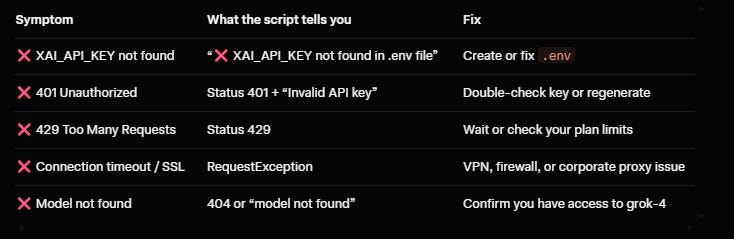
On failure you get the exact error message from xAI (401, 429, 500, etc.) plus the raw response body — no more guessing.
Common Problems It Instantly Diagnoses
Pro Tips from Someone Who Runs This Daily
Add it to your CI pipeline as a health-check step before deploying
Modify the prompt to test your system prompt or few-shot examples
Change ‘stream’: True and parse the SSE stream to verify streaming works
Swap ‘model’: ‘grok-4’ for any other model you have access to (grok-3, etc.)
Wrap it in a bash alias: alias xai-test=’python ~/scripts/TestxAIAPI.py’
Ready to Level Up?
Once the test passes, you’re cleared for takeoff. Start building:
Retrieval-augmented chatbots
Autonomous agents with tool calling
Vision-enabled apps (image understanding coming soon)
Research assistants that can browse the web and analyze PDFs
The xAI API is fast, uncensored, and gets better every week. This tiny script removes the very first friction point so you can focus on what matters — shipping cool stuff.
👉 Grab the script + full README here: https://github.com/rod-trent/JunkDrawer/tree/main/xAI%20API%20Test%20Tool
Happy hacking, and welcome to the xAI universe!
If you build something awesome with Grok, drop me a link — I’d love to see it.